> For the complete documentation index, see [llms.txt](https://docs.sprinto.com/llms.txt). Markdown versions of documentation pages are available by appending `.md` to page URLs; this page is available as [Markdown](https://docs.sprinto.com/monitors/cloud-and-infrastructure-monitoring/azure/how-to-resolve-sprinto-check-for-protecting-azure-sql-database-from-public-access.md).
# How to resolve Sprinto check for protecting Azure SQL Database from public access
### About
Sprinto Check: Azure SQL database should be protected from direct internet traffic
Protecting public access to your Azure SQL Database is crucial for maintaining security compliance. Sprinto guides on configuring and passing the monitor related to Azure SQL Database Public Access Protection.
### Purpose
The purpose of the Sprinto check for Azure SQL Database Public Access Protection is to enforce security compliance by securing public access to your SQL database. This implementation helps you:
* Security Compliance: Ensure that public access to your Azure SQL Database is disabled, meeting compliance requirements.
* Data Protection: Safeguard sensitive data by preventing unauthorized access through public endpoints.
* Sprinto Check Passing: Update the Sprinto check status to "Passing" after implementing the recommended protection measures.
{% hint style="warning" %}
#### Important Note
Azure automatically creates a built-in firewall rule named **`AllowAllWindowsAzureIps`** with the IP range **0.0.0.0 to 0.0.0.0**.
\
This rule does **not** provide public internet access. Instead, it allows connections only from Azure services.
Sprinto recognises this rule as **safe**, and the monitor *will continue to pass* when this is the only rule present.
If your SQL Server shows the `AllowAllWindowsAzureIps` rule and the Sprinto check is passing, this is expected behaviour and does not indicate exposure to the public internet.
{% endhint %}
### How to Implement
To resolve the Sprinto check, follow these steps within the Azure portal:
#### Before you Begin
* Ensure that you have the necessary permissions to modify SQL Database settings.
* Log in to Sprinto as an administrator.
#### Protection Implementation
1. Log in to the[ Azure portal](https://portal.azure.com/) using your credentials.
2. Select the SQL databases resource or use the top search bar to locate the database.
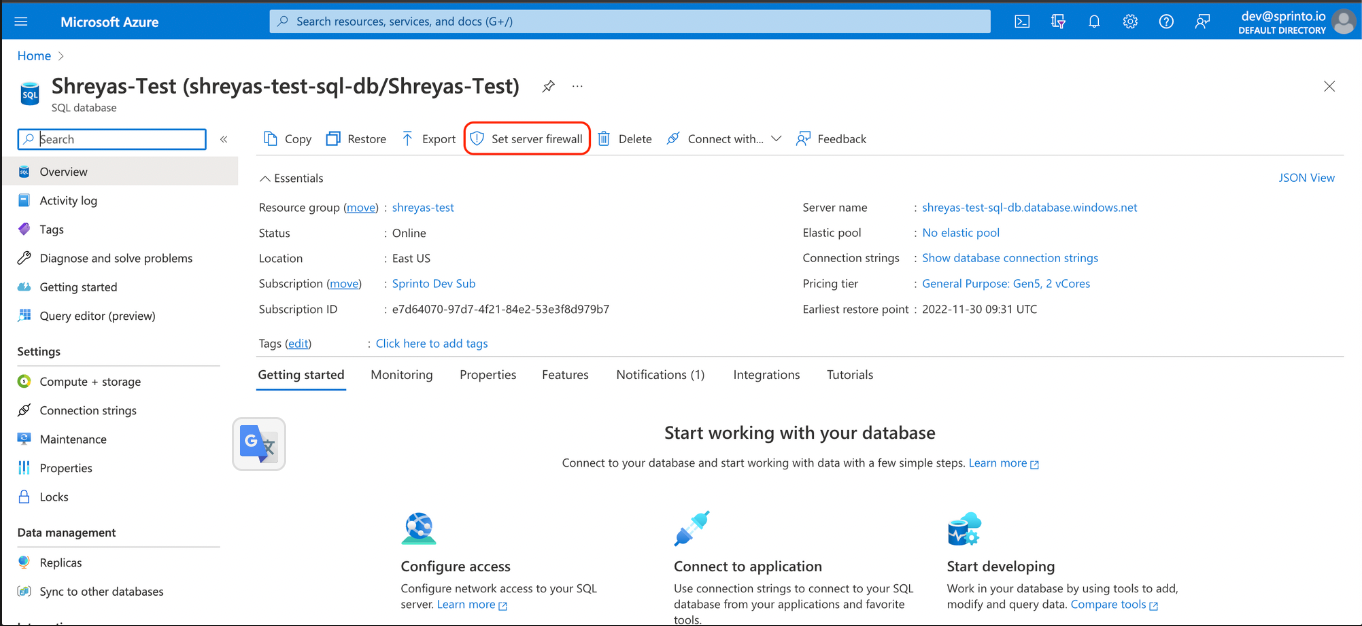
3. Choose the respective SQL database and click Set server firewall.
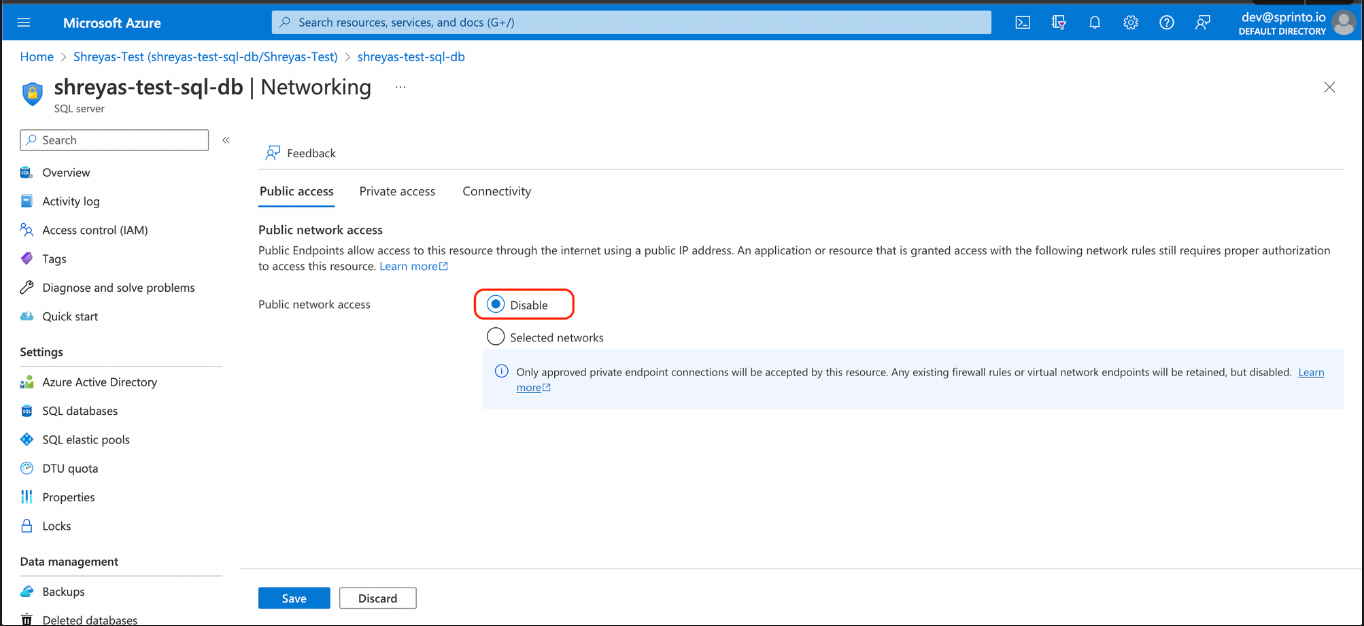
4. On Networking page, under Public tab, select Disable for Public network access.
5. Click **Save**.
Once the firewall configuration is updated, Sprinto retrieves the changes and sets the Azure SQL database should be protected from direct internet traffic check status to "Passing."
For additional assistance with the Sprinto check, please get in touch with [Sprinto Support](mailto:www.support@sprinto.com).
---
# Agent Instructions
This documentation is published with GitBook. GitBook is the documentation platform designed so that both humans and AI agents can read, navigate, and reason over technical content effectively. Learn more at gitbook.com.
## Querying This Documentation
If you need additional information that is not directly available in this page, you can query the documentation dynamically by asking a question.
Perform an HTTP GET request on the current page URL with the `ask` query parameter, and the optional `goal` query parameter:
```
GET https://docs.sprinto.com/monitors/cloud-and-infrastructure-monitoring/azure/how-to-resolve-sprinto-check-for-protecting-azure-sql-database-from-public-access.md?ask=&goal=
```
`ask` is the immediate question: it should be specific, self-contained, and written in natural language.
`goal` is optional and describes the broader end goal you are ultimately trying to accomplish on behalf of the user. GitBook uses it to tailor the answer towards what is most useful for that goal.
The response will contain a direct answer to the question and relevant excerpts and sources from the documentation.
Use this mechanism when the answer is not explicitly present in the current page, you need clarification or additional context, or you want to retrieve related documentation sections.