> For the complete documentation index, see [llms.txt](https://docs.sprinto.com/llms.txt). Markdown versions of documentation pages are available by appending `.md` to page URLs; this page is available as [Markdown](https://docs.sprinto.com/monitors/cloud-and-infrastructure-monitoring/azure/how-to-resolve-sprinto-check-to-redirect-all-http-traffic-to-http-for-azure-web-apps.md).
# How to resolve Sprinto check to redirect all HTTP traffic to HTTP for Azure Web Apps
### About:
Sprinto check: Ensure Web App Redirects All HTTP traffic to HTTPS in Azure App Service
The above-mentioned Sprinto check verifies that your Azure App Service web applications are configured to redirect all HTTP traffic to HTTPS. HTTPS is a secure protocol that encrypts communication between the web server and the client, providing data protection and privacy.
### Purpose:
The purpose of this check is to enforce the use of secure communication protocols for your web applications hosted on Azure App Service. By redirecting all HTTP traffic to HTTPS, you can ensure that sensitive data, such as user credentials and personal information, is transmitted securely over an encrypted connection. This measure helps protect your web applications and users from potential eavesdropping, man-in-the-middle attacks, and other security threats.
### How to fix this check:
Follow the below steps to resolve this check:
#### Before you begin
* Ensure you have the administrator privilege to manage Azure App Service settings.
#### Enabling HTTP to HTTPS Redirection
1. Log in to [Azure portal](https://azure.microsoft.com/en-in/get-started/azure-portal) using your credentials.
2. Navigate to the App Services service.
3. Click on your desired app from the list.
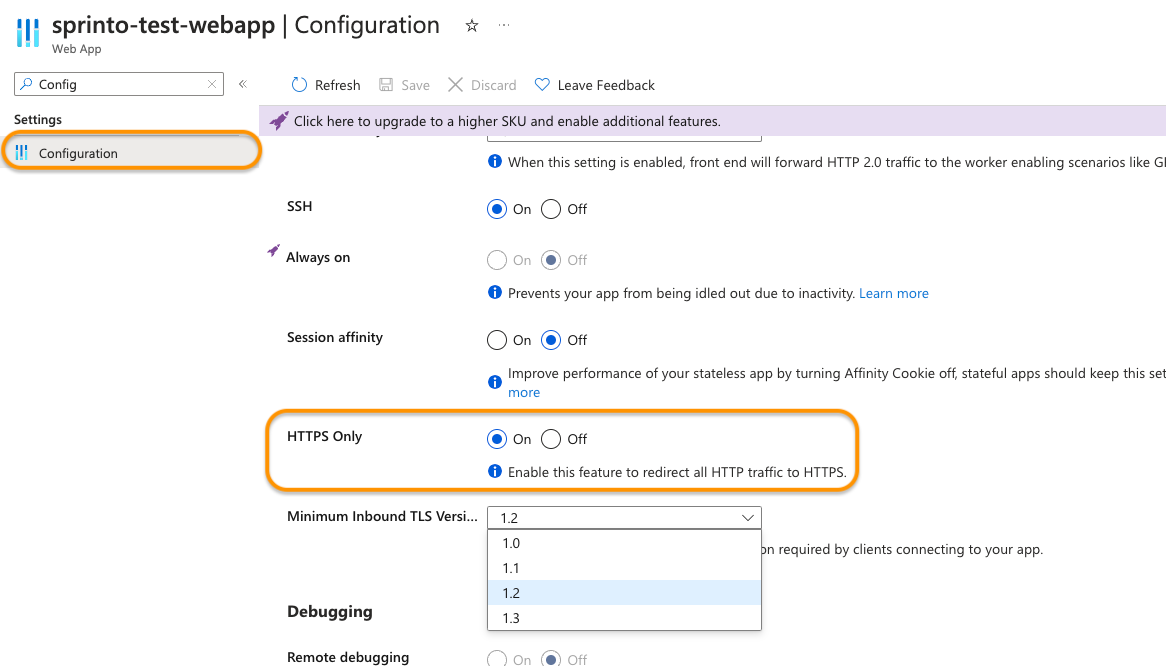
4. Click on Configuration under Settings from the left-side navigation bar.
5. Ensure the HTTPS Only option is turned On. If it's Off, turn it On.
6. Click Save to apply the changes.
7. Repeat the above steps for all Azure Web Apps.
Sprinto will detect the configuration change and set the check status to "Passing.”
Contact [Sprinto support](mailto:www.support@sprinto.com) if you have any queries related to the check or need assistance.
---
# Agent Instructions
This documentation is published with GitBook. GitBook is the documentation platform designed so that both humans and AI agents can read, navigate, and reason over technical content effectively. Learn more at gitbook.com.
## Querying This Documentation
If you need additional information that is not directly available in this page, you can query the documentation dynamically by asking a question.
Perform an HTTP GET request on the current page URL with the `ask` query parameter, and the optional `goal` query parameter:
```
GET https://docs.sprinto.com/monitors/cloud-and-infrastructure-monitoring/azure/how-to-resolve-sprinto-check-to-redirect-all-http-traffic-to-http-for-azure-web-apps.md?ask=&goal=
```
`ask` is the immediate question: it should be specific, self-contained, and written in natural language.
`goal` is optional and describes the broader end goal you are ultimately trying to accomplish on behalf of the user. GitBook uses it to tailor the answer towards what is most useful for that goal.
The response will contain a direct answer to the question and relevant excerpts and sources from the documentation.
Use this mechanism when the answer is not explicitly present in the current page, you need clarification or additional context, or you want to retrieve related documentation sections.