> For the complete documentation index, see [llms.txt](https://docs.sprinto.com/llms.txt). Markdown versions of documentation pages are available by appending `.md` to page URLs; this page is available as [Markdown](https://docs.sprinto.com/monitors/cloud-and-infrastructure-monitoring/azure/how-to-resolve-sprinto-check-for-restricting-public-access-on-azure-storage-accounts.md).
# How to resolve Sprinto check for restricting public access on Azure storage accounts
### About:
Sprinto check: Ensure that Public Network Access is disabled for storage accounts
The above-mentioned Sprinto check in Sprinto verifies that the "Public Network Access" setting is disabled for your Azure storage accounts. This setting controls whether or not the storage account accepts requests from public networks.
### Purpose:
The purpose of this check is to enforce a secure configuration for your Azure storage accounts by restricting public network access. Disabling public network access helps prevent unauthorized access to your storage accounts from public networks, reducing the risk of data breaches and unauthorized access to sensitive data.
### How to fix this check:
Follow the below steps to resolve this check:
#### Before you begin
* Ensure you have administrator permissions to manage Azure storage account configurations.
#### Updating Storage Account Settings
Note: Repeat the procedure below for all storage accounts that store critical information for the organization or customer.
1. Log in to the [Azure Portal](https://azure.microsoft.com/en-in/get-started/azure-portal) using your credentials.
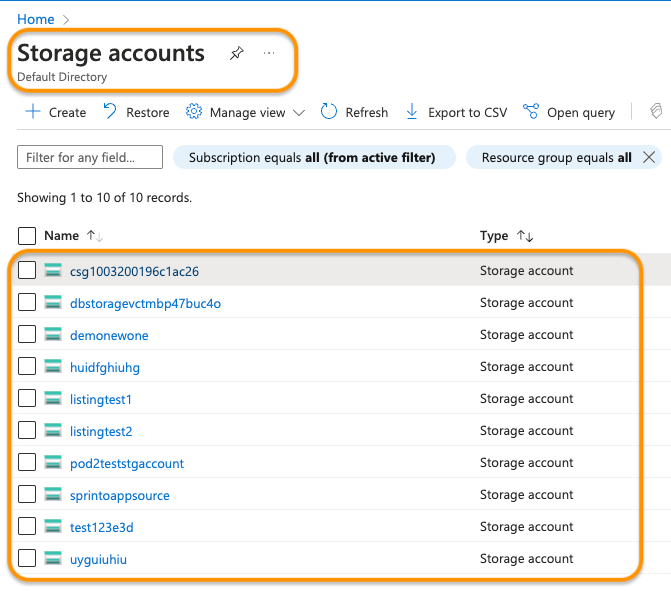
2. Navigate to the Storage Accounts service.
3. Select your desired storage account.
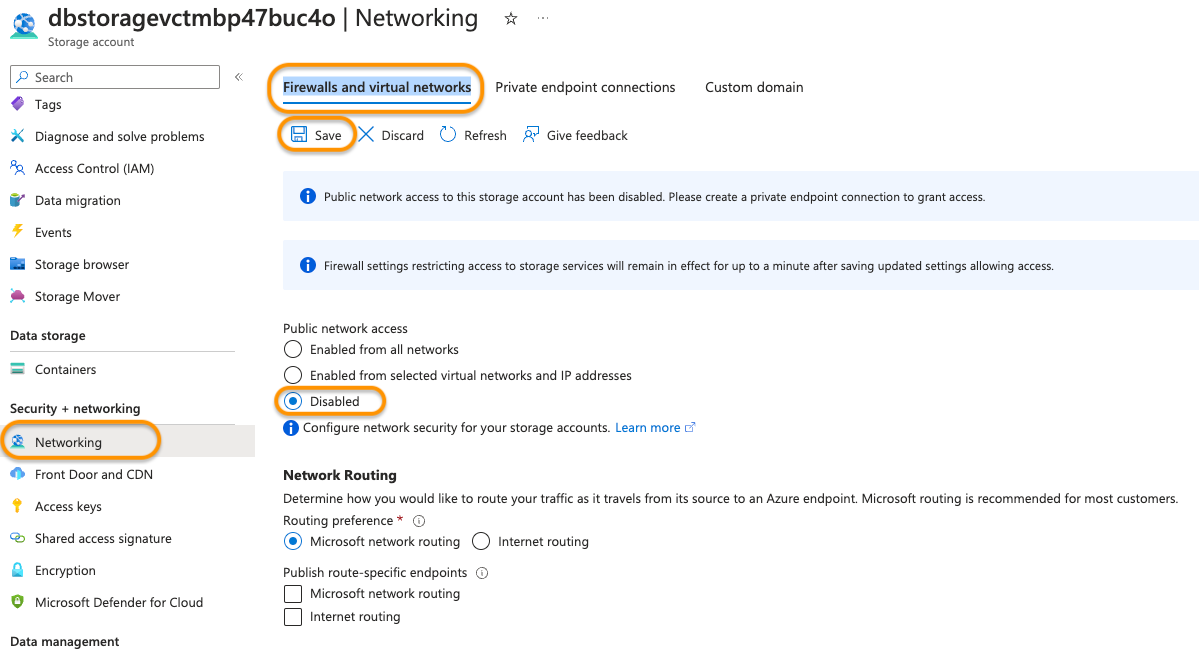
4. Click Networking, then select the Firewalls and Virtual Networks tab.
5. Look for the Public Network Access and set it to Disabled.
6. Click Save to apply the changes.
Sprinto will detect the configuration change and set the check status to "Passing."
Contact Sprinto support if you have any queries related to the check or need assistance.
---
# Agent Instructions
This documentation is published with GitBook. GitBook is the documentation platform designed so that both humans and AI agents can read, navigate, and reason over technical content effectively. Learn more at gitbook.com.
## Querying This Documentation
If you need additional information that is not directly available in this page, you can query the documentation dynamically by asking a question.
Perform an HTTP GET request on the current page URL with the `ask` query parameter, and the optional `goal` query parameter:
```
GET https://docs.sprinto.com/monitors/cloud-and-infrastructure-monitoring/azure/how-to-resolve-sprinto-check-for-restricting-public-access-on-azure-storage-accounts.md?ask=&goal=
```
`ask` is the immediate question: it should be specific, self-contained, and written in natural language.
`goal` is optional and describes the broader end goal you are ultimately trying to accomplish on behalf of the user. GitBook uses it to tailor the answer towards what is most useful for that goal.
The response will contain a direct answer to the question and relevant excerpts and sources from the documentation.
Use this mechanism when the answer is not explicitly present in the current page, you need clarification or additional context, or you want to retrieve related documentation sections.