> For the complete documentation index, see [llms.txt](https://docs.sprinto.com/llms.txt). Markdown versions of documentation pages are available by appending `.md` to page URLs; this page is available as [Markdown](https://docs.sprinto.com/monitors/governance-and-compliance-monitors/resolve-sprinto-check-for-risk-scoring-and-treatment.md).
# Resolve Sprinto Check For Risk Scoring & Treatment
### About
Sprinto Check: Risk should be scored & treated
This Sprinto check fails whenever a risk is added to the risk register without being scored or assigned a treatment plan.
Risk scoring in Sprinto evaluates risks based on parameters such as the impact and likelihood of inherent and residual risks. These parameters help compute an overall risk score, which determines the severity of the risk on the risk heat map.
The risk treatment plan specifies the techniques employed to mitigate the risk’s impact and likelihood.
#### Who does risk scoring?
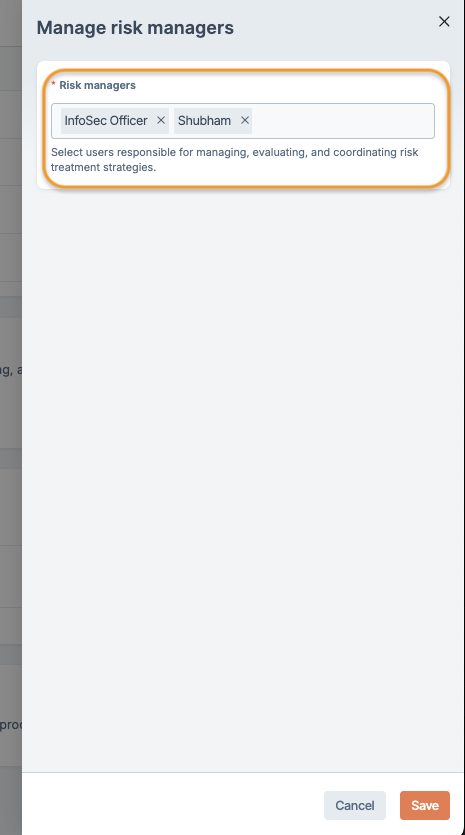
The risk scoring is primarily done by the risk managers. By default, the InfoSec officer role on your Sprinto account is assigned for risk scoring. You can add multiple risk managers to delegate the risk maintenance.
#### Add multiple risk managers
To add multiple risk managers, do the following:
1. Navigate to[ the Risks](https://app.sprinto.com/app/admin/riskProfile) page and select the Configuration tab.
2. Scroll down and click Manage next to Risk Managers.
3. Select your desired security hub admin as a risk manager, then click Save.
### Purpose
This check ensures that every risk added to the risk register is scored and has a treatment plan. Risks missing either component remain in an “Incomplete” state and cannot be utilized for evidence collection.
### How to Fix
To resolve this check, update the risk scoring and/or treatment plan for any risks showing the following statuses under the Pending Actions column:
* Needs Treatment
* Needs Scoring
* Needs Scoring and Treatment
For detailed instructions, refer to the guide on[ Risk Scoring and Treatment](https://sprinto.freshdesk.com/support/solutions/articles/72000636648-risk-scoring-for-added-risks-from-risk-register).
### Support
Please get in touch with our [support team](mailto:www.support@sprinto.com) if you have any query related to the check or need any assistance.
---
# Agent Instructions
This documentation is published with GitBook. GitBook is the documentation platform designed so that both humans and AI agents can read, navigate, and reason over technical content effectively. Learn more at gitbook.com.
## Querying This Documentation
If you need additional information that is not directly available in this page, you can query the documentation dynamically by asking a question.
Perform an HTTP GET request on the current page URL with the `ask` query parameter, and the optional `goal` query parameter:
```
GET https://docs.sprinto.com/monitors/governance-and-compliance-monitors/resolve-sprinto-check-for-risk-scoring-and-treatment.md?ask=&goal=
```
`ask` is the immediate question: it should be specific, self-contained, and written in natural language.
`goal` is optional and describes the broader end goal you are ultimately trying to accomplish on behalf of the user. GitBook uses it to tailor the answer towards what is most useful for that goal.
The response will contain a direct answer to the question and relevant excerpts and sources from the documentation.
Use this mechanism when the answer is not explicitly present in the current page, you need clarification or additional context, or you want to retrieve related documentation sections.