> For the complete documentation index, see [llms.txt](https://docs.sprinto.com/llms.txt). Markdown versions of documentation pages are available by appending `.md` to page URLs; this page is available as [Markdown](https://docs.sprinto.com/monitors/dr.-sprinto-and-manual-inputs/how-to-resolve-drsprinto-configuration-issue-on-windows-registry.md).
# How to resolve DrSprinto configuration issue on Windows registry
#### Issue Overview
Sometimes, DrSprinto encounters difficulty running or picking up specific information from a device. This is often attributed to configuration issues specific to the device.
#### Resolution Steps
To address the Windows Registry issue hindering DrSprinto from running or reading your device information, follow these steps:
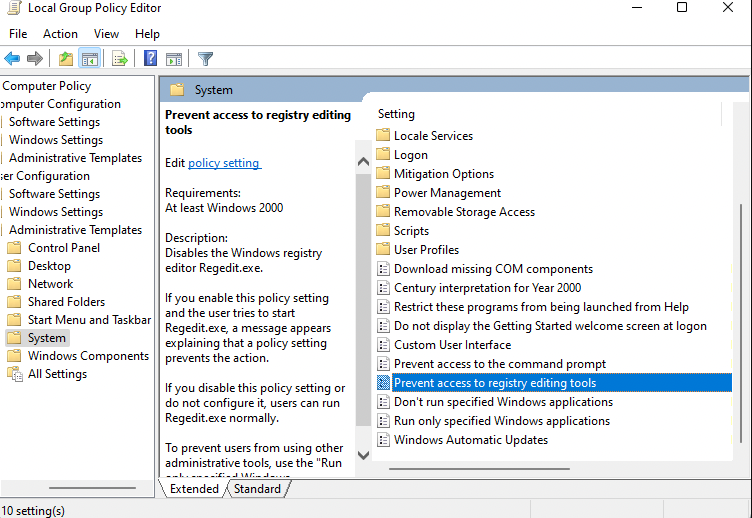
1. Type gpedit.msc in the Windows Start Search Bar and hit Enter. This opens the Group Policy Editor.
2. Navigate to User Configuration > Administrative Templates > System.
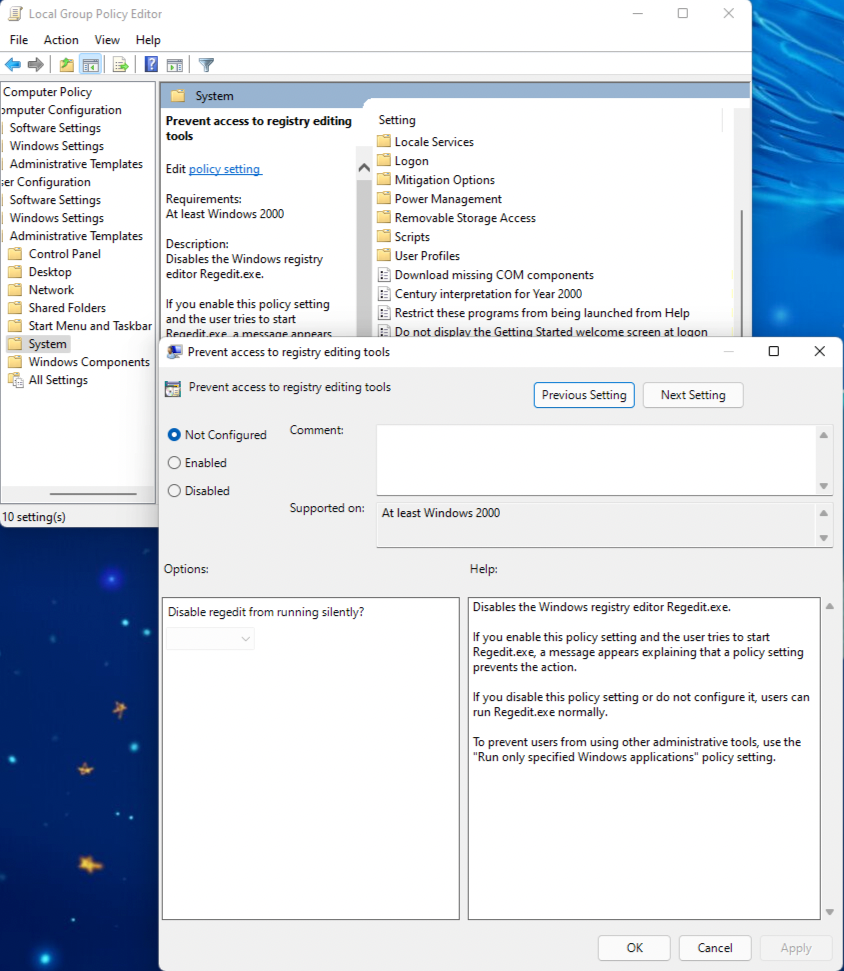
3. Double-click on Prevent Access To Registry Editing Tools setting.
4. Set it to Disabled / Not configured, then click **OK**.
5. After making these changes, try running the DrSprinto app as an Administrator. Right-click on the app and choose the "Run as Admin" option.
#### Further Troubleshooting
If the issue persists, follow these additional steps:
1. Write to with your Debug logs.
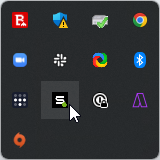
2. Find the Debug log information by navigating to the Icon tray on the right side of the taskbar.
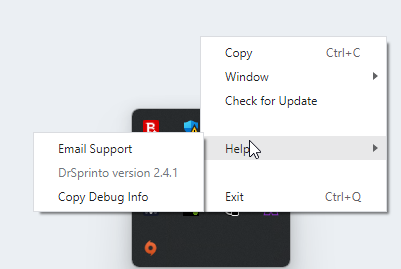
3. Right-click on the Dr.Sprinto Icon.
4. Click on Help and then select "Copy Debug Info".
5. This action copies the debug information to your clipboard. Paste this information in the email that you send to [Sprinto support](mailto:www.support@sprinto.com).
These steps should help resolve the Windows Registry issue with DrSprinto. If you continue facing problems, feel free to reach out to our [support team](mailto:www.support@sprinto.com) for further assistance.
---
# Agent Instructions
This documentation is published with GitBook. GitBook is the documentation platform designed so that both humans and AI agents can read, navigate, and reason over technical content effectively. Learn more at gitbook.com.
## Querying This Documentation
If you need additional information that is not directly available in this page, you can query the documentation by asking a question.
Perform an HTTP GET request on the following URL with the `ask` and `goal` query parameters:
```
GET https://docs.sprinto.com/monitors/dr.-sprinto-and-manual-inputs/how-to-resolve-drsprinto-configuration-issue-on-windows-registry.md?ask=&goal=
```
`ask` is the immediate question: it should be specific, self-contained, and written in natural language.
`goal` is what the user is ultimately trying to achieve, the reason they need the answer. Sharing it helps GitBook give you a better, more relevant answer. A goal is most helpful when it describes the outcome the user wants rather than restating the question. For example, with `ask=how do I create an API token`, a goal like `automate deployments from our CI pipeline` lets GitBook tailor the answer to that use case.
The response will contain a direct answer to the question and relevant excerpts and sources from the documentation.
Use this mechanism when the answer is not explicitly present in the current page, you need clarification or additional context, or you want to retrieve related documentation sections.