> For the complete documentation index, see [llms.txt](https://docs.sprinto.com/llms.txt). Markdown versions of documentation pages are available by appending `.md` to page URLs; this page is available as [Markdown](https://docs.sprinto.com/monitors/cloud-and-infrastructure-monitoring/oracle/how-to-resolve-sprinto-check-for-oracle-cloud-atp-database-backup-enabling.md).
# How to resolve Sprinto check for Oracle Cloud ATP Database Backup enabling
### About
Sprinto check: ATP database backup should be enabled
Oracle Cloud Autonomous Transaction Processing (ATP) provides a fully managed database service that is highly available, secure, and scalable. Enabling backups for your ATP database is essential for data protection, disaster recovery, and compliance with regulatory requirements.
### Purpose
The purpose of enabling backups on Oracle Cloud ATP database is to ensure data availability, integrity, and recoverability. This feature helps you:
1. Data Protection: Enable backups to safeguard your critical data against accidental deletion, corruption, or loss due to system failures or disasters.
2. Disaster Recovery: Create backups to facilitate quick recovery in the event of data corruption, hardware failures, or other unforeseen incidents, minimizing downtime and ensuring business continuity.
3. Compliance Requirements: Meet regulatory and compliance requirements by implementing a robust backup strategy that includes regular backups and retention policies for your ATP database.
Enabling backups for your Oracle Cloud ATP database provides peace of mind, knowing that your data is securely backed up and can be restored quickly in case of emergencies.
### How to resolve
By default, all the ATP databases created on Oracle Cloud has automatic backup enabled with backup retention set to 60 days. If required, you can set the backup retention period from 1 to 60 days.
Follow the below step to ensure your desire ATP database has the automatic backup enabled.
#### Before you begin
* Ensure you the “Admin” access on the Oracle Cloud account you wish to perform the following action.
#### Enabling automatic backup
1. Log in to[ Oracle Cloud](https://www.oracle.com/in/cloud/sign-in.html) account using your credentials.
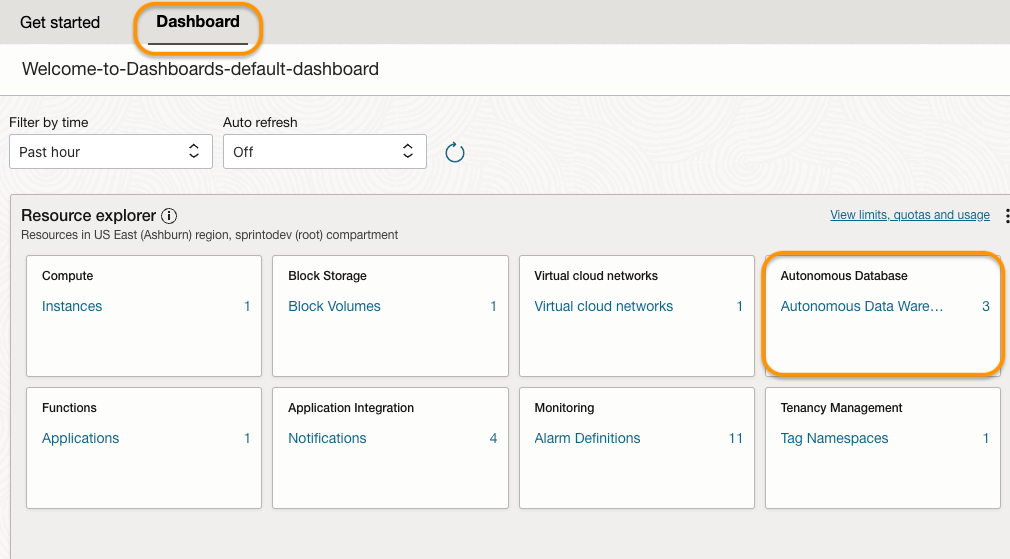
2. From the Oracle Cloud Dashboard, select Autonomous Database under Resource explorer.
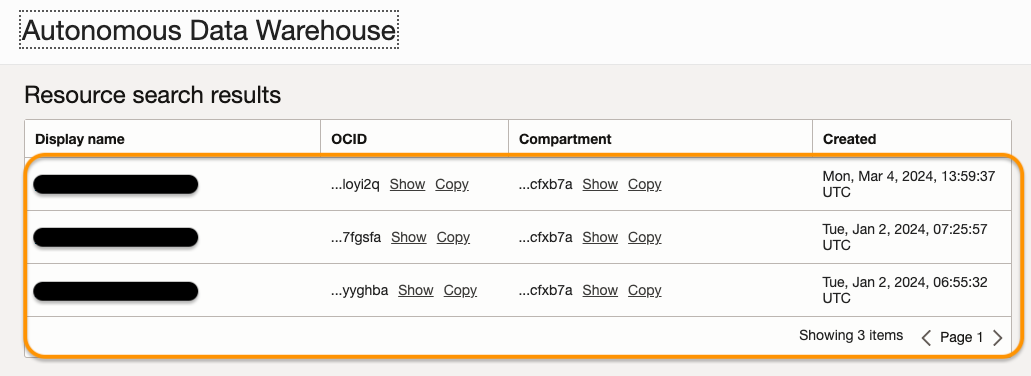
3. Select your desired ATP database from the list.
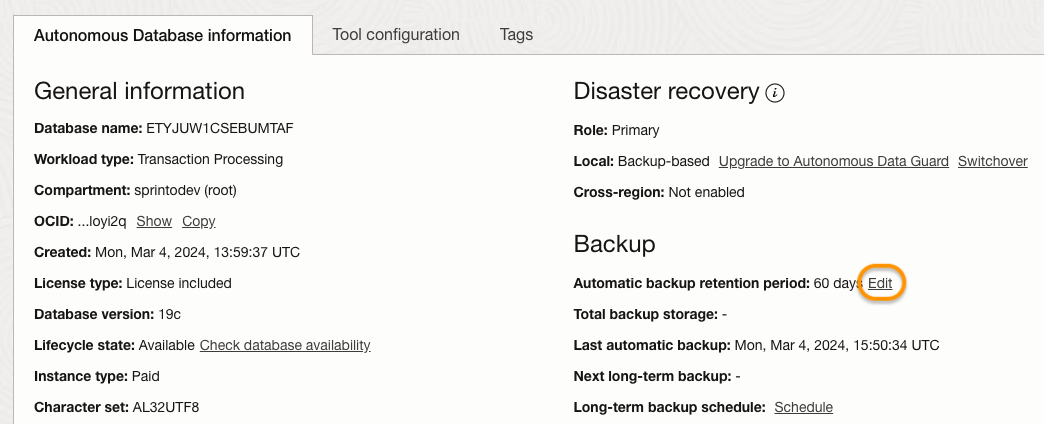
4. On Autonomous Database information tab, ensure the Automatic backup retention period reflects the retention period.
5. If required, click on Edit next to the retention period to modify it.
Once you have enabled the backup, Sprinto fetches the changes and sets the respective Sprinto check status to “Passing.”
If you need any assistance with the Sprinto check, kindly get in touch with [Sprinto support](mailto:www.support@sprinto.com).
---
# Agent Instructions
This documentation is published with GitBook. GitBook is the documentation platform designed so that both humans and AI agents can read, navigate, and reason over technical content effectively. Learn more at gitbook.com.
## Querying This Documentation
If you need additional information that is not directly available in this page, you can query the documentation dynamically by asking a question.
Perform an HTTP GET request on the current page URL with the `ask` query parameter, and the optional `goal` query parameter:
```
GET https://docs.sprinto.com/monitors/cloud-and-infrastructure-monitoring/oracle/how-to-resolve-sprinto-check-for-oracle-cloud-atp-database-backup-enabling.md?ask=&goal=
```
`ask` is the immediate question: it should be specific, self-contained, and written in natural language.
`goal` is optional and describes the broader end goal you are ultimately trying to accomplish on behalf of the user. GitBook uses it to tailor the answer towards what is most useful for that goal.
The response will contain a direct answer to the question and relevant excerpts and sources from the documentation.
Use this mechanism when the answer is not explicitly present in the current page, you need clarification or additional context, or you want to retrieve related documentation sections.