> For the complete documentation index, see [llms.txt](https://docs.sprinto.com/llms.txt). Markdown versions of documentation pages are available by appending `.md` to page URLs; this page is available as [Markdown](https://docs.sprinto.com/monitors/cloud-and-infrastructure-monitoring/oracle/how-to-resolve-sprinto-check-for-monitoring-oracle-cloud-compute-instance-cpu-utilization.md).
# How to resolve Sprinto check for monitoring Oracle Cloud Compute Instance CPU Utilization
### About
Sprinto check: Compute instance CPU utilization should be monitored
Oracle Cloud Compute instances form the backbone of your cloud infrastructure, powering various workloads and applications. Monitoring the CPU utilization of your Oracle Cloud Compute instances is essential for optimizing performance, identifying potential bottlenecks, and ensuring efficient resource utilization.
### Purpose
The purpose of monitoring Oracle Cloud Compute instance CPU utilization is to manage and optimize compute resources proactively. This practice helps you:
1. Performance Optimization: Monitor CPU utilization to ensure that your compute instances operate within acceptable performance thresholds, delivering optimal performance for your applications and workloads.
2. Resource Management: Identify and address issues related to high CPU usage, ensuring efficient utilization of compute resources and preventing performance degradation or resource contention.
3. Capacity Planning: Gain insights into CPU utilization trends and patterns to support capacity planning initiatives, ensuring that you have the right amount of compute resources to meet current and future workload demands.
By monitoring CPU utilization metrics, you can effectively manage compute resources, optimize performance, and maintain a healthy and responsive infrastructure environment.
### How to resolve
Follow the below steps to create a notification for Compute Instance CPU utilization:
#### Before you begin
* Ensure you have the “Admin” access on the Oracle Cloud account for which you wish to perform the following action.
#### Create a notification for CPU utilization
1. Log in on[ Oracle Cloud](https://www.oracle.com/in/cloud/sign-in.html) using your credentials.
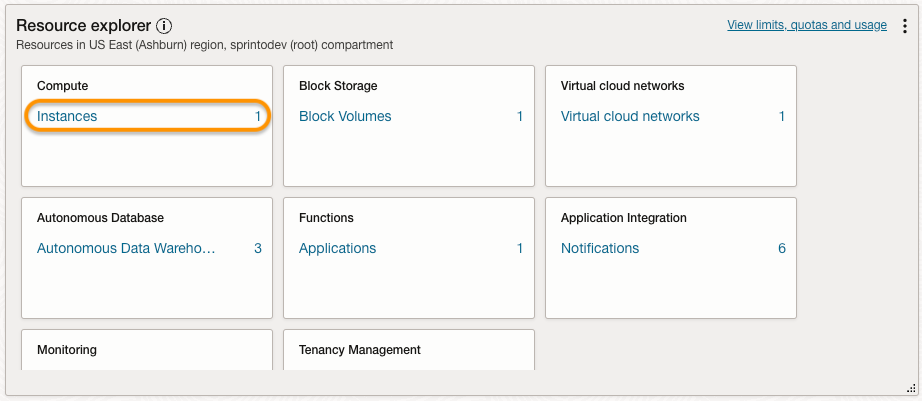
2. From the Oracle Dashboard, select Instances under the Resource Explorer category.
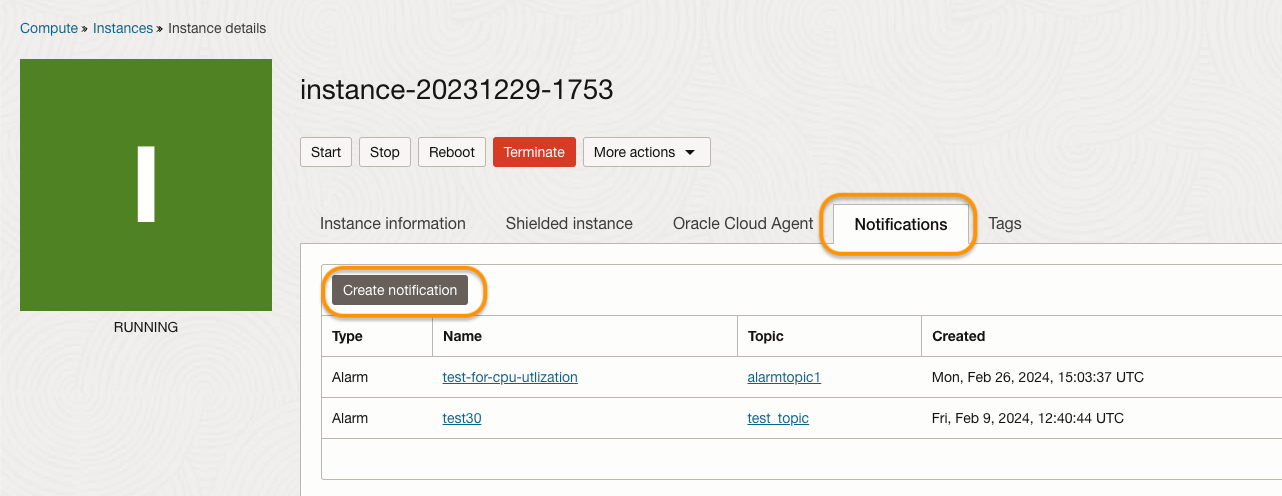
3. On Instances page, select the compute instance you wish to create the notification.
4. On Instance details page, select the Notifications tab and click Create notification.
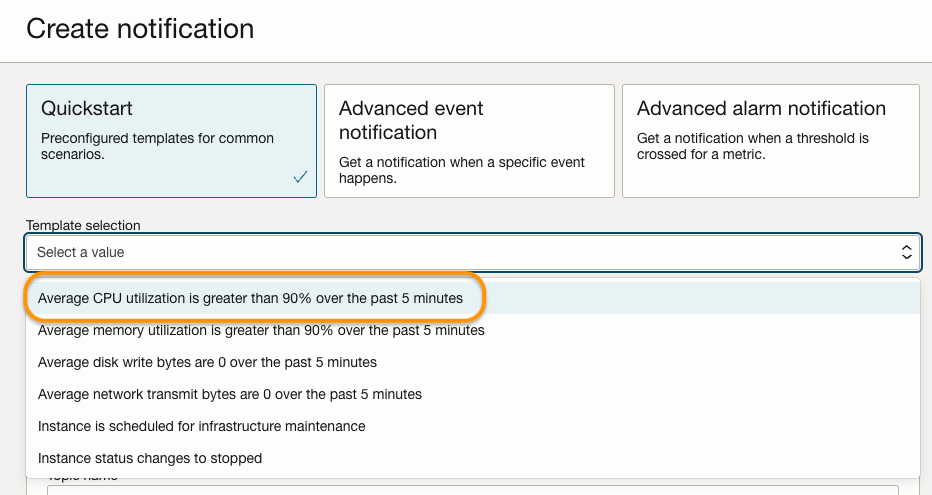
5. Select the following notification activation condition from the drop-down menu under Template selection.
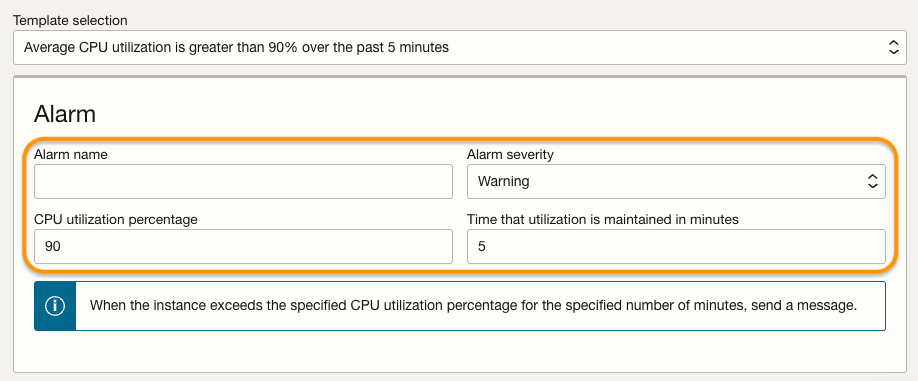
6. Enter the following details to define the notification trigger point.
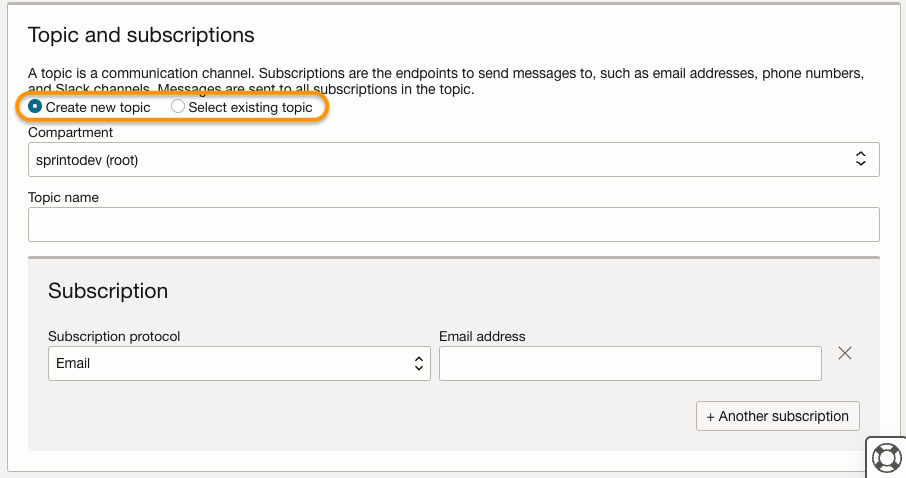
7. Select the notification topic. You can select a previously created topic or create a new one by defining the user that gets notified.
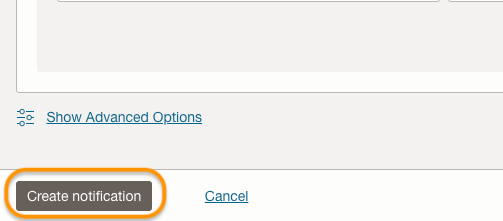
8. Review your selections, then click Create notification.
**Note:**\
For monitors to validate the check, the entity must meet at least one of the following conditions:
* The query includes the string `'CpuUtilization'`.
* The entity is tagged with the freeform tag `'CTX_NOTIFICATIONS_COMPUTE_ID'` containing the entity identifier.
Once the alert is created, Sprinto retrieves the change from your integrated Oracle Cloud account, and sets the assigned check status to "Passing."
If you need any assistance with the Sprinto check, please contact [Sprinto Support](mailto:www.support@sprinto.com).
---
# Agent Instructions
This documentation is published with GitBook. GitBook is the documentation platform designed so that both humans and AI agents can read, navigate, and reason over technical content effectively. Learn more at gitbook.com.
## Querying This Documentation
If you need additional information that is not directly available in this page, you can query the documentation dynamically by asking a question.
Perform an HTTP GET request on the current page URL with the `ask` query parameter, and the optional `goal` query parameter:
```
GET https://docs.sprinto.com/monitors/cloud-and-infrastructure-monitoring/oracle/how-to-resolve-sprinto-check-for-monitoring-oracle-cloud-compute-instance-cpu-utilization.md?ask=&goal=
```
`ask` is the immediate question: it should be specific, self-contained, and written in natural language.
`goal` is optional and describes the broader end goal you are ultimately trying to accomplish on behalf of the user. GitBook uses it to tailor the answer towards what is most useful for that goal.
The response will contain a direct answer to the question and relevant excerpts and sources from the documentation.
Use this mechanism when the answer is not explicitly present in the current page, you need clarification or additional context, or you want to retrieve related documentation sections.