> For the complete documentation index, see [llms.txt](https://docs.sprinto.com/llms.txt). Markdown versions of documentation pages are available by appending `.md` to page URLs; this page is available as [Markdown](https://docs.sprinto.com/monitors/cloud-and-infrastructure-monitoring/gcp/how-to-resolve-sprinto-check-for-monitoring-gcp-firestore-read-frequency.md).
# How to resolve Sprinto check for monitoring GCP Firestore read frequency
### About
Sprinto check: GCP Firestore read frequency should be monitored
Firestore, part of Google Cloud Platform (GCP), is a NoSQL document database that plays a crucial role in supporting scalable and responsive applications. Monitoring the read frequency within Firestore is vital for gaining insights into how often documents are being read, which is essential for optimizing application performance and ensuring efficient database operations.
### Purpose
Firestore is a critical component of your application's backend, and monitoring the read frequency is essential to ensure optimal performance and responsiveness. Sprinto activates the Firestore read frequency monitoring check to provide insights into the frequency of document reads, enabling you to detect potential issues and optimize your Firestore database.
### How to resolve
To resolve this check, create a monitoring alert on your GCP account for the Firestore service. Take the below steps to create a monitoring alert:
#### Before you begin
* Ensure you have "Admin" access on the GCP account for which you want to create a monitoring alert.
* Log in on Sprinto as administrator.
#### Creating monitoring alert
1. Log in on[ GCP console](https://console.cloud.google.com/) using your credentials.
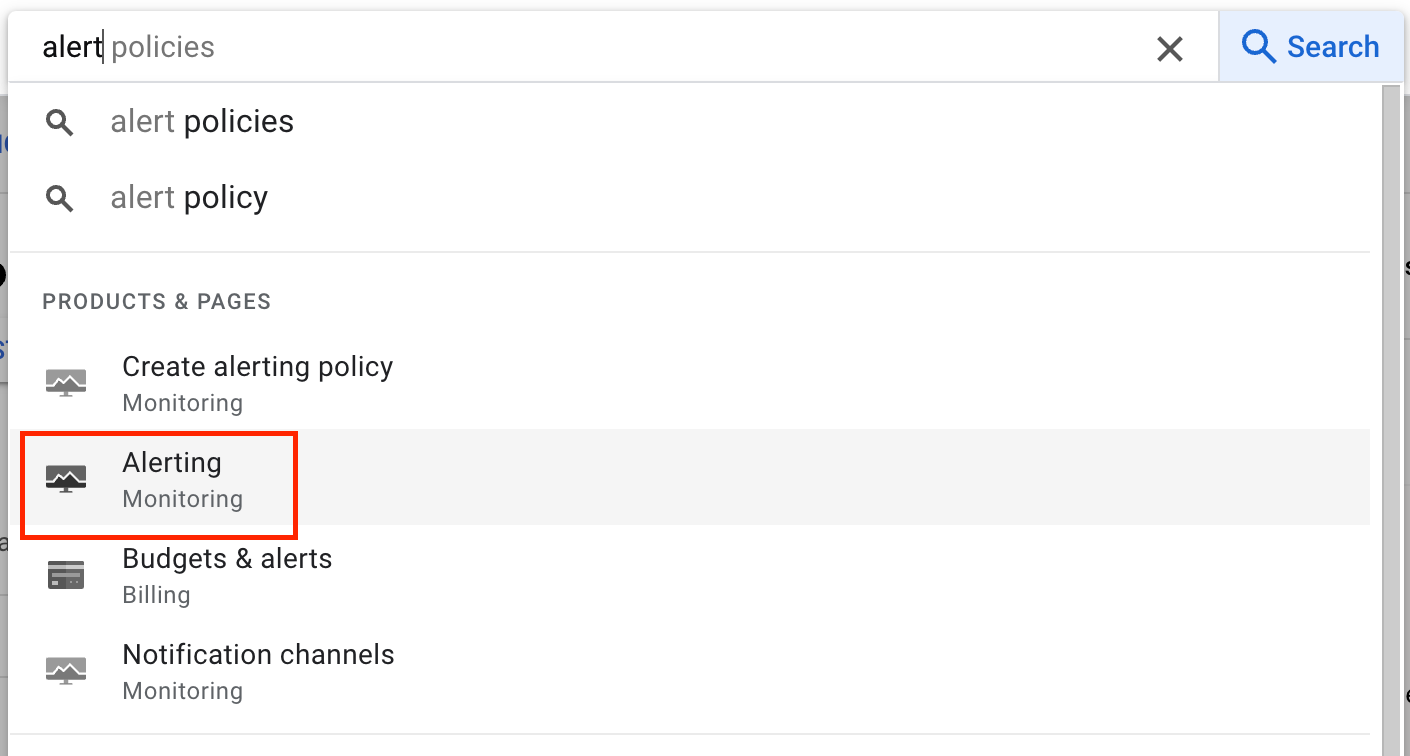
2. From global search, open Alerting service.
3. On Alerting page, click Create Policy to create a new monitoring alert.
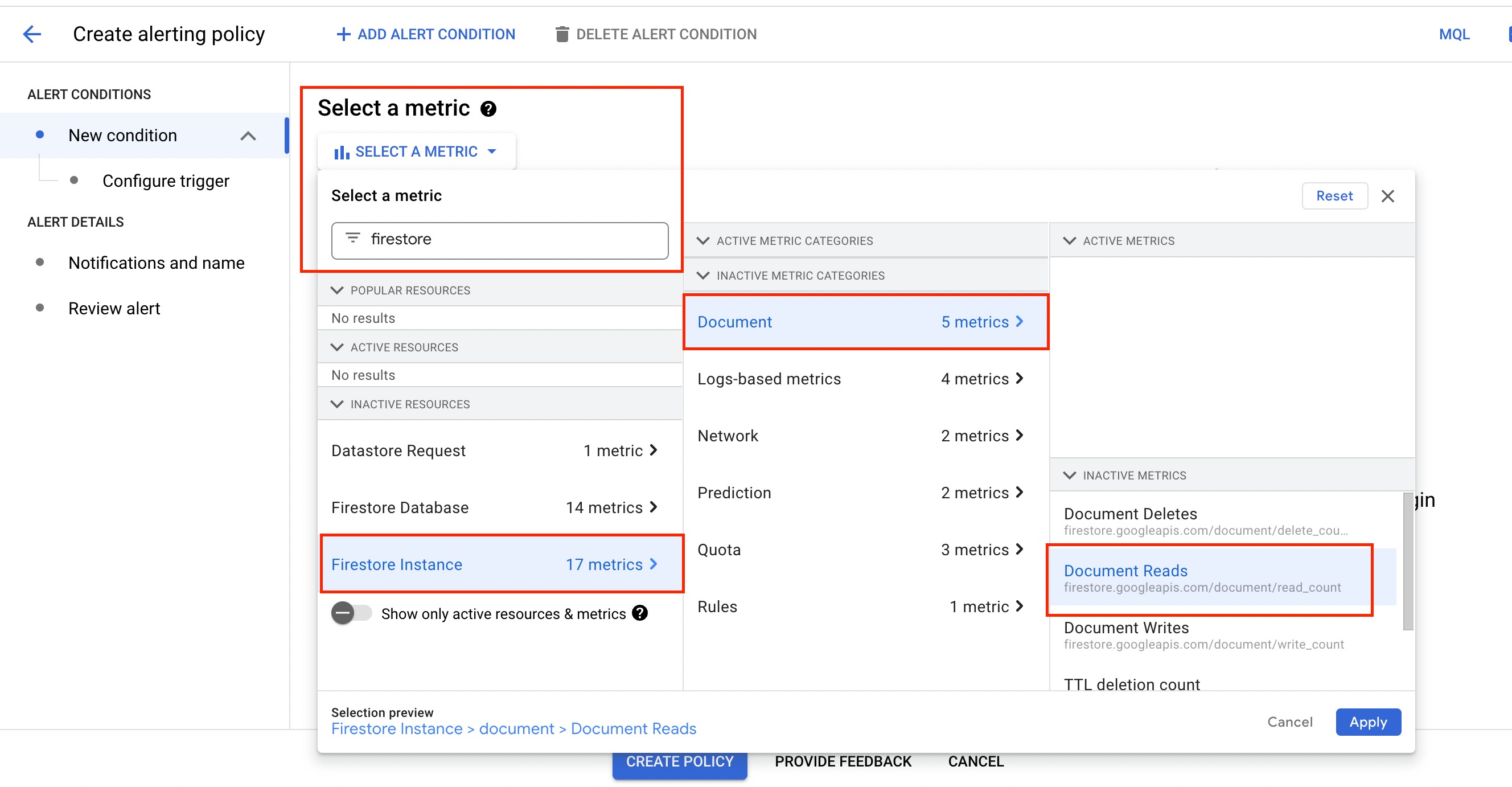
4. From New conditions, click Metric.
5. From the dropdown menu, select Firestore, then go to Firestore Instance > Document > Document Reads and click Apply.
6. Click Next.
7. Enter a suitable threshold value for alert triggering. Make other changes as per your requirements.
8. Click Next.
9. Choose the notification channel to receive the alert and the incident auto-close time period.
10. Scroll to the bottom of the page and enter the Alert Policy name.
11. Click Create Policy.
Once the alert is created, Sprinto receives the change through your integration on Sprinto and sets the assigned check status to "Passing.”
If you need any assistance on Sprinto check, please get in touch with [Sprinto Support](mailto:www.support@sprinto.com).
---
# Agent Instructions
This documentation is published with GitBook. GitBook is the documentation platform designed so that both humans and AI agents can read, navigate, and reason over technical content effectively. Learn more at gitbook.com.
## Querying This Documentation
If you need additional information that is not directly available in this page, you can query the documentation by asking a question.
Perform an HTTP GET request on the following URL with the `ask` and `goal` query parameters:
```
GET https://docs.sprinto.com/monitors/cloud-and-infrastructure-monitoring/gcp/how-to-resolve-sprinto-check-for-monitoring-gcp-firestore-read-frequency.md?ask=&goal=
```
`ask` is the immediate question: it should be specific, self-contained, and written in natural language.
`goal` is what the user is ultimately trying to achieve, the reason they need the answer. Sharing it helps GitBook give you a better, more relevant answer. A goal is most helpful when it describes the outcome the user wants rather than restating the question. For example, with `ask=how do I create an API token`, a goal like `automate deployments from our CI pipeline` lets GitBook tailor the answer to that use case.
The response will contain a direct answer to the question and relevant excerpts and sources from the documentation.
Use this mechanism when the answer is not explicitly present in the current page, you need clarification or additional context, or you want to retrieve related documentation sections.