> For the complete documentation index, see [llms.txt](https://docs.sprinto.com/llms.txt). Markdown versions of documentation pages are available by appending `.md` to page URLs; this page is available as [Markdown](https://docs.sprinto.com/monitors/cloud-and-infrastructure-monitoring/aws/how-to-resolve-sprinto-check-for-enabling-ebs-volume-backup.md).
# How to resolve Sprinto check for enabling EBS volume backup
### About
Sprinto Check: AWS EBS volume backup should be enabled
Sprinto introduces a dedicated check to ensure the proper configuration of Elastic Block Store (EBS) volume backups in your AWS environment. Activating EBS volume backups is crucial for data protection, disaster recovery, and ensuring the resilience of your cloud storage.
### Purpose
Enabling EBS volume backups in AWS is fundamental for safeguarding critical data. Regular backups provide a point-in-time recovery option, reducing the risk of data loss due to accidental deletion, corruption, or system failures.
### How to Enable EBS Volume Backups
Follow the steps below to configure and enable backups for your AWS EBS volumes:
#### Before you Begin
* Ensure you have permission to configure EBS volume backups in your AWS account.
* Confirm the EBS volumes for which you want to enable backups.
* Log in to the AWS Management Console with administrative credentials.
#### Enable EBS Volume Backups
1. Navigate to the[ AWS Management Console](https://aws.amazon.com/console/).
2. Go to EC2 Dashboard > Volumes.
3. Select the EBS volume for which you want to enable backups.
4. In the volume details page, click on the Actions dropdown.
5. Choose Create Snapshot to initiate the backup process.
6. Enter a meaningful description for the snapshot and click Create Snapshot.
7. Repeat this process periodically to ensure regular backups.
#### Automate Backup with AWS Backup Service
1. Navigate to the AWS Backup console.
2. Click on Backup plans and create a new backup plan.
3. Configure the plan with the desired settings, including the backup frequency.
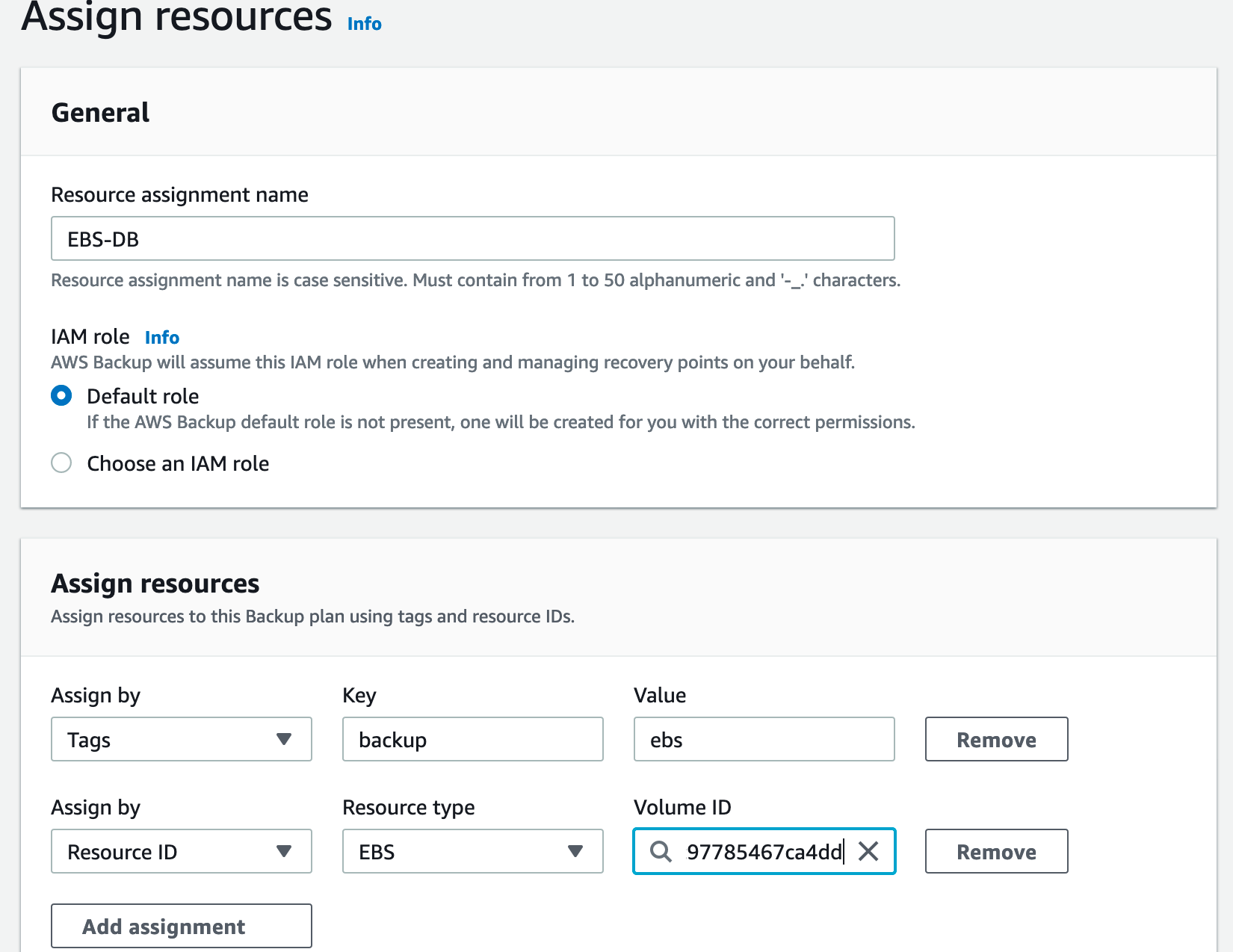
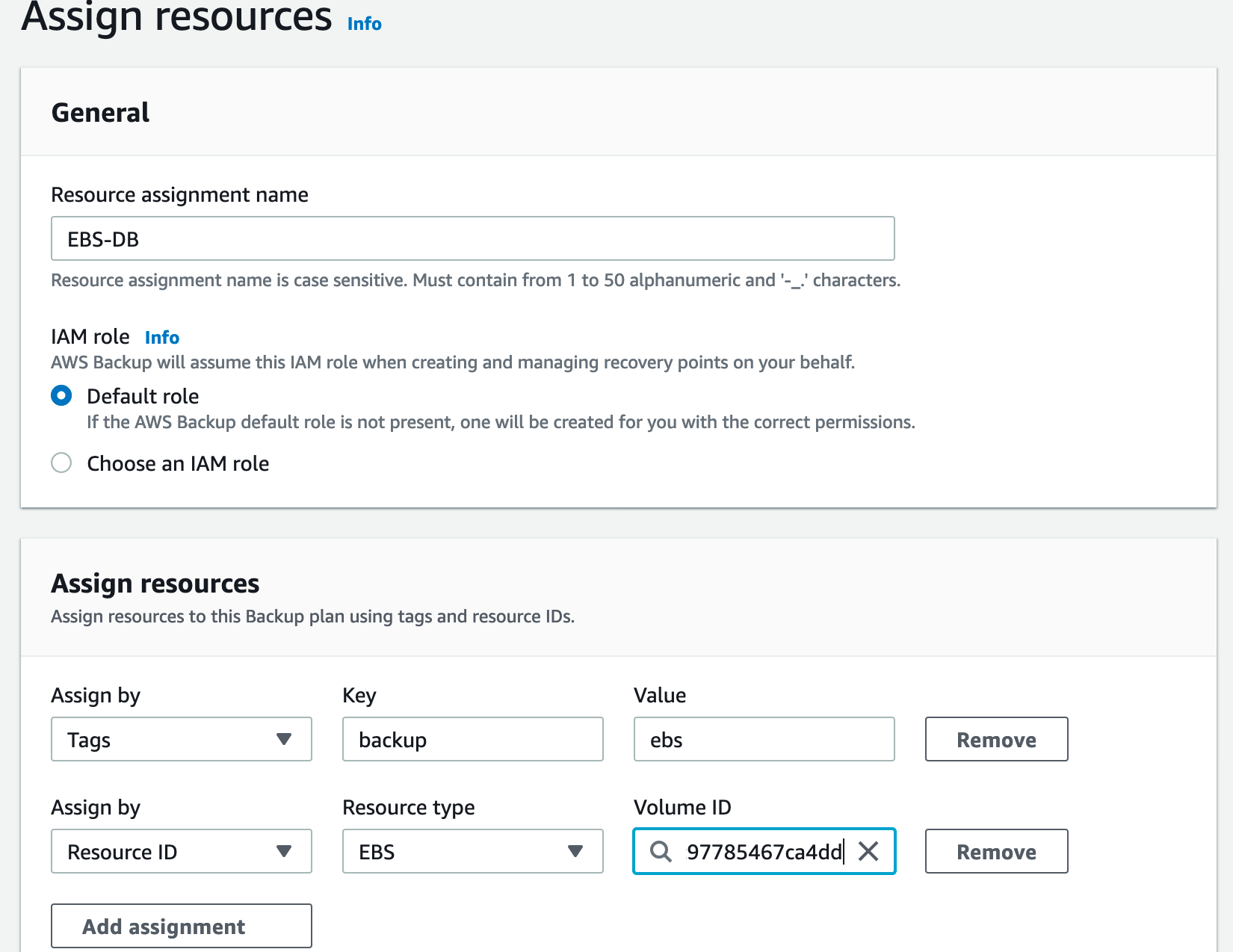
4. Assign EBS volumes to the backup plan.
5. Save the backup plan, and AWS Backup will automatically manage EBS volume backups according to the defined schedule.
Enabling EBS volume backups in AWS is essential for maintaining data integrity and resilience. Sprinto will verify the backup configuration, marking the EBS Volume Backup check status as "Passing."
If you have any questions or need assistance with the Sprinto check for AWS EBS Volume Backup, please get in touch with [Sprinto support](mailto:www.support@sprinto.com). We're here to assist you!
---
# Agent Instructions
This documentation is published with GitBook. GitBook is the documentation platform designed so that both humans and AI agents can read, navigate, and reason over technical content effectively. Learn more at gitbook.com.
## Querying This Documentation
If you need additional information that is not directly available in this page, you can query the documentation dynamically by asking a question.
Perform an HTTP GET request on the current page URL with the `ask` query parameter, and the optional `goal` query parameter:
```
GET https://docs.sprinto.com/monitors/cloud-and-infrastructure-monitoring/aws/how-to-resolve-sprinto-check-for-enabling-ebs-volume-backup.md?ask=&goal=
```
`ask` is the immediate question: it should be specific, self-contained, and written in natural language.
`goal` is optional and describes the broader end goal you are ultimately trying to accomplish on behalf of the user. GitBook uses it to tailor the answer towards what is most useful for that goal.
The response will contain a direct answer to the question and relevant excerpts and sources from the documentation.
Use this mechanism when the answer is not explicitly present in the current page, you need clarification or additional context, or you want to retrieve related documentation sections.