> For the complete documentation index, see [llms.txt](https://docs.sprinto.com/llms.txt). Markdown versions of documentation pages are available by appending `.md` to page URLs; this page is available as [Markdown](https://docs.sprinto.com/monitors/audit-logs-and-evidence-trails/how-to-resolve-sprinto-check-to-ensure-that-aws-server-logs-are-retained-for-at-least-90-days.md).
# How to resolve Sprinto check to ensure that AWS server logs are retained for at least 90 days
### About:
Sprinto Check: AWS server access logs should be retained for 90 days
This Sprinto check verifies that the log retention period for your AWS server logs, such as Amazon CloudWatch Logs or AWS CloudTrail logs, is set to at least 90 days.
**Note:** At this time, our platform **does not support** [**AWS CloudWatch Composite Alarms**](https://docs.aws.amazon.com/AmazonCloudWatch/latest/monitoring/AlarmThatCombinesAlarms.html) or [**Math-Based Alarms**](https://docs.aws.amazon.com/AmazonCloudWatch/latest/monitoring/using-metric-math.html).\
This means you cannot create alarms that:\
Combine multiple alarms using logical conditions (e.g., `ALARM1 AND ALARM2`)\
Use metric math expressions (e.g., calculating averages or deltas across metrics)
### Purpose:
The purpose of retaining server logs for at least 90 days is to ensure that you have an adequate historical record of system events, user activities, and security-related incidents within your AWS environment. This extended log retention period enables effective monitoring, troubleshooting, and forensic analysis in case of security breaches, compliance audits, or other investigations.
### How to fix:
Follow the below steps to fix this check:
### Before you begin
* Ensure you have administrator privilege on the AWS account to modify the log retention period.
### Reviewing logs retention period
Follow the below procedure to review and modify the CloudWatch log group retention period:
1. Log in to the[ AWS Console](https://aws.amazon.com/console/) using your credentials or Single Sign-On (SSO) options.
2. Navigate to the AWS CloudWatch service.
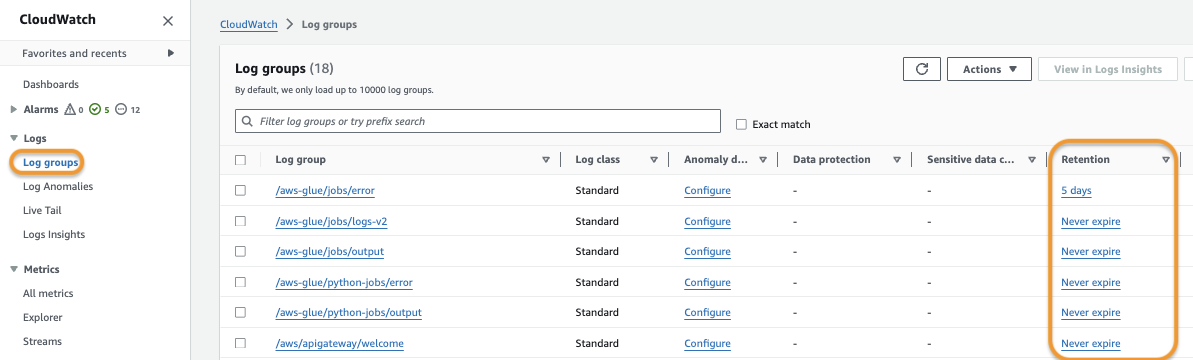
3. Click on Log Groups under Logs from the navigation bar on the left side.
4. Review the retention period column, and ensure that all log group retention is set to be at least 90 days. The Sprinto check starts failing If any log group retention is less than 90 days. \
**Note**: Sprinto check passes if the configured retention period is more than 90 days.
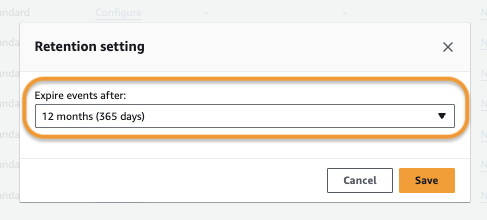
5. Click on the retention period and modify it to equal or more than 90 days. Click **Save** to apply the changes.
6. Repeat the above steps for all log groups that have a retention set of less than 90 days.
Sprinto detects the configuration change and sets the check status to “Passing.”
Contact [Sprinto support](mailto:www.support@sprinto.com) if you have any queries related to the check or need assistance.
---
# Agent Instructions
This documentation is published with GitBook. GitBook is the documentation platform designed so that both humans and AI agents can read, navigate, and reason over technical content effectively. Learn more at gitbook.com.
## Querying This Documentation
If you need additional information that is not directly available in this page, you can query the documentation dynamically by asking a question.
Perform an HTTP GET request on the current page URL with the `ask` query parameter, and the optional `goal` query parameter:
```
GET https://docs.sprinto.com/monitors/audit-logs-and-evidence-trails/how-to-resolve-sprinto-check-to-ensure-that-aws-server-logs-are-retained-for-at-least-90-days.md?ask=&goal=
```
`ask` is the immediate question: it should be specific, self-contained, and written in natural language.
`goal` is optional and describes the broader end goal you are ultimately trying to accomplish on behalf of the user. GitBook uses it to tailor the answer towards what is most useful for that goal.
The response will contain a direct answer to the question and relevant excerpts and sources from the documentation.
Use this mechanism when the answer is not explicitly present in the current page, you need clarification or additional context, or you want to retrieve related documentation sections.