> For the complete documentation index, see [llms.txt](https://docs.sprinto.com/llms.txt). Markdown versions of documentation pages are available by appending `.md` to page URLs; this page is available as [Markdown](https://docs.sprinto.com/monitors/audit-logs-and-evidence-trails/how-to-resolve-sprinto-check-to-enable-aws-cloudtrail-s3-logging-bucket-access.md).
# How to resolve Sprinto check to enable AWS CloudTrail S3 logging bucket access
About:
Sprinto check: AWS CloudTrail S3 logging bucket access logging should be enabled
Enabling AWS CloudTrail S3 logging bucket access logging is a security feature allowing you to capture and record all access and activity within the S3 bucket, designated as the centralized logging repository for CloudTrail events. It provides a detailed audit trail of all interactions with the CloudTrail log files stored in the S3 bucket, such as object uploads, downloads, deletions, and metadata changes.
The following Sprinto check gets activated if any target AWS S3 bucket from the CloudTrail has logging access disabled. To pass the Sprinto check, enable logging access on all target S3 buckets.
### Purpose:
Enabling AWS CloudTrail S3 logging bucket access logging strengthens data security and compliance within your AWS environment by providing a comprehensive audit trail of all interactions with the CloudTrail log files stored in the S3 bucket.
### How to resolve:
The below step shows how to find the target S3 bucket for a CloudTrail instance and then enable access logging on the respective S3 bucket:
1. Finding the target S3 bucket for a CloudTrail.
* Log in to the[ AWS Console](https://aws.amazon.com/marketplace/management/signin) using your credentials.
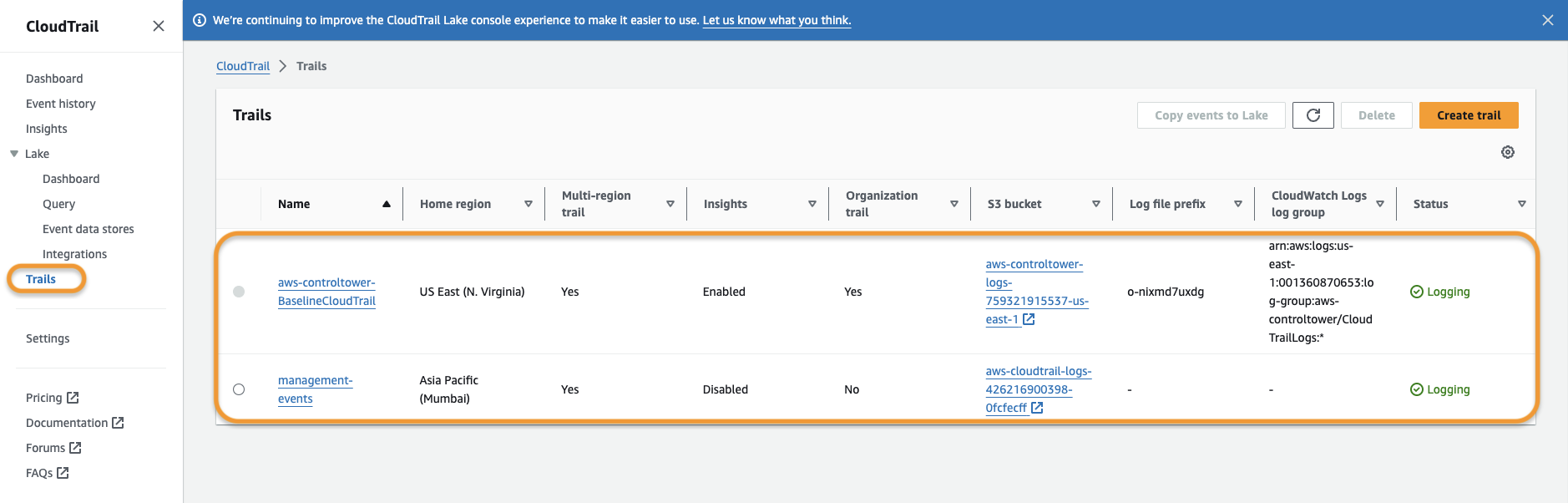
* Navigate to the CloudTrail service.
* Click Trails from the left side navigation menu, then select the CloudTrail instance you wish to know the target S3 bucket.
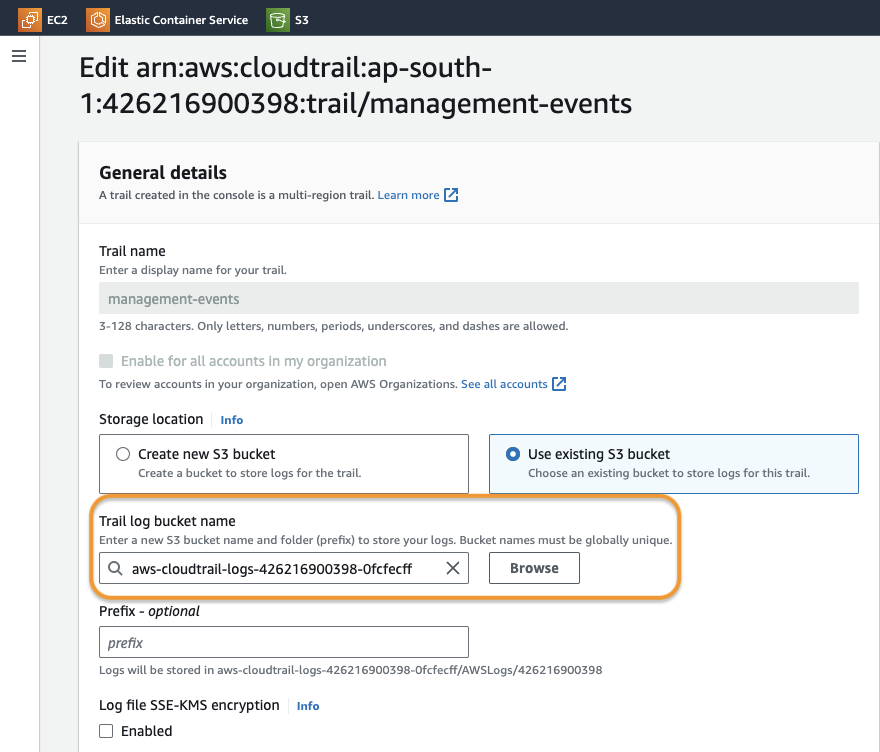
* Click Edit from the General details section.
* You can review the S3 bucket name from the Trail log bucket name.
2. Enable access logging on the S3 bucket.
* From the AWS Console, navigate to the AWS S3 service.
* Select the target S3 bucket from the list for which you wish to enable access logging.
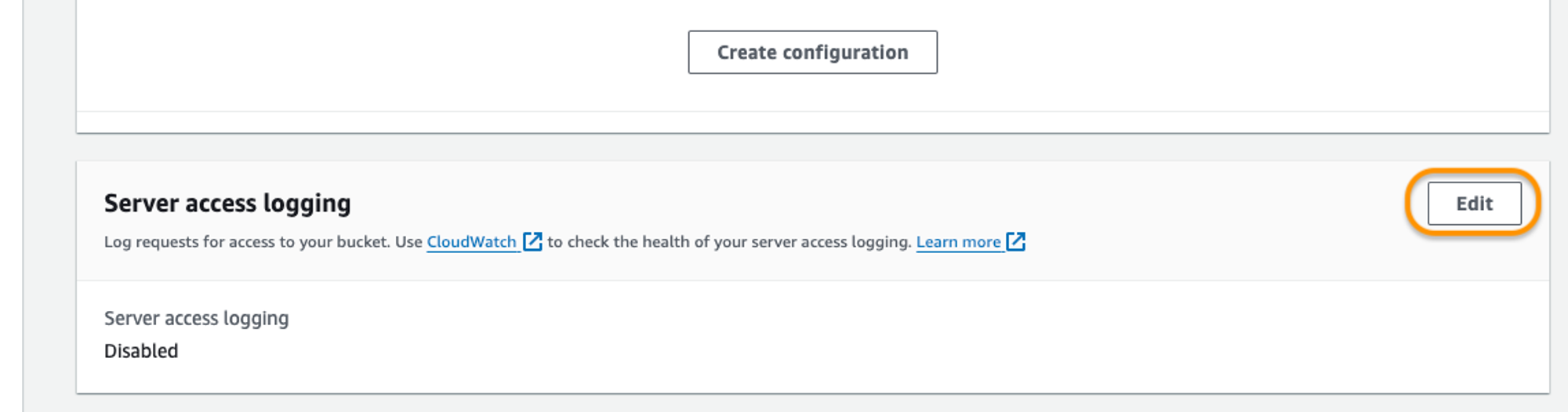
* Select the Properties tab, and then click Edit from the Server access logging section.
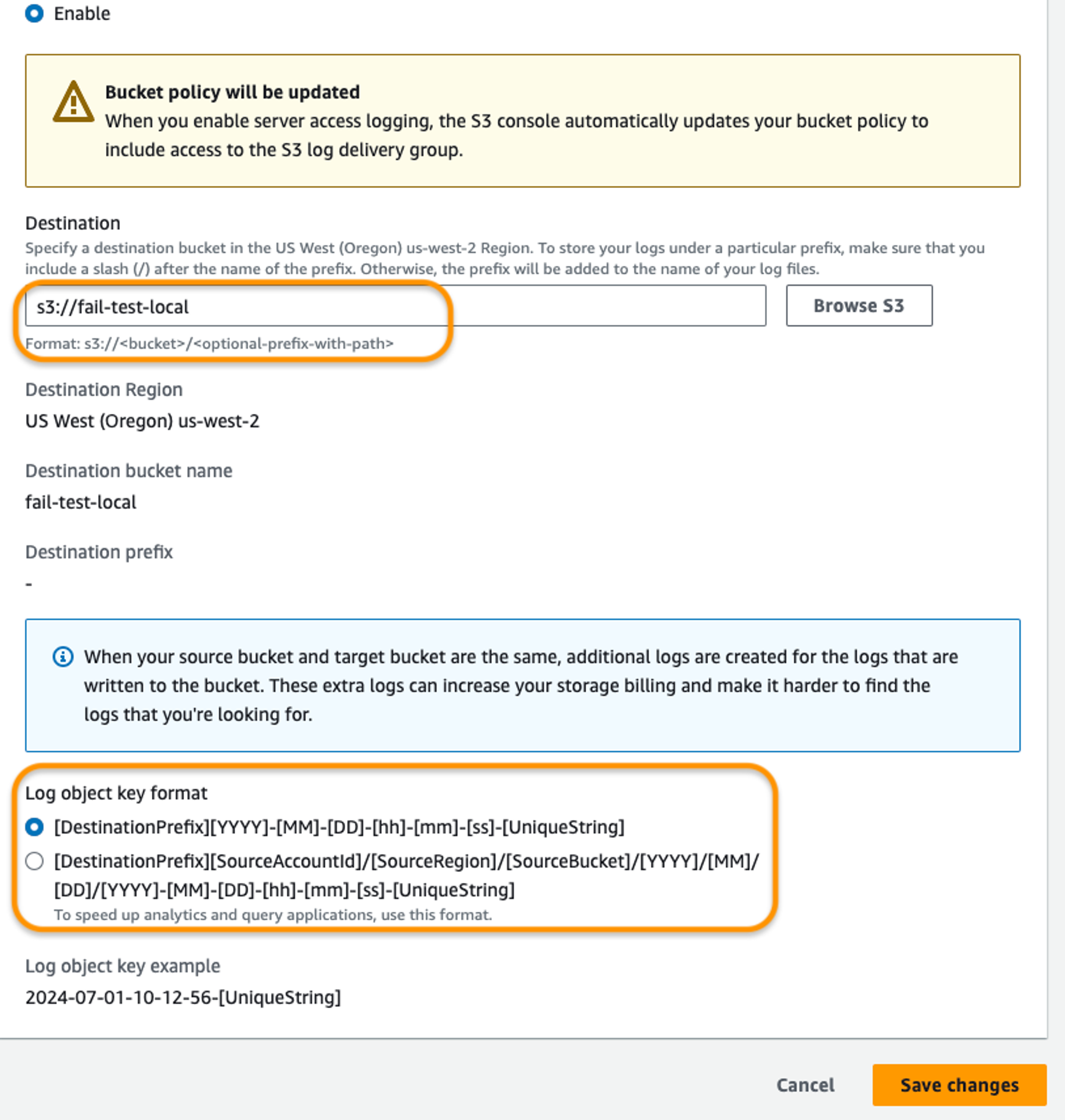
* Toggle the Server access logging configuration to Enable, and then select the target bucket and destination to store the logs.
* If required, customize the Log object key format.
* Click Save Changes to apply the changes.
Repeat the above steps to ensure that all target S3 buckets from CloudTrail have access logging enabled.
Please contact our [Support team](mailto:www.support@Sprinto.com) If you have any queries related to the check or need assistance.
---
# Agent Instructions
This documentation is published with GitBook. GitBook is the documentation platform designed so that both humans and AI agents can read, navigate, and reason over technical content effectively. Learn more at gitbook.com.
## Querying This Documentation
If you need additional information that is not directly available in this page, you can query the documentation dynamically by asking a question.
Perform an HTTP GET request on the current page URL with the `ask` query parameter, and the optional `goal` query parameter:
```
GET https://docs.sprinto.com/monitors/audit-logs-and-evidence-trails/how-to-resolve-sprinto-check-to-enable-aws-cloudtrail-s3-logging-bucket-access.md?ask=&goal=
```
`ask` is the immediate question: it should be specific, self-contained, and written in natural language.
`goal` is optional and describes the broader end goal you are ultimately trying to accomplish on behalf of the user. GitBook uses it to tailor the answer towards what is most useful for that goal.
The response will contain a direct answer to the question and relevant excerpts and sources from the documentation.
Use this mechanism when the answer is not explicitly present in the current page, you need clarification or additional context, or you want to retrieve related documentation sections.