> For the complete documentation index, see [llms.txt](https://docs.sprinto.com/llms.txt). Markdown versions of documentation pages are available by appending `.md` to page URLs; this page is available as [Markdown](https://docs.sprinto.com/monitors/audit-logs-and-evidence-trails/how-to-resolve-sprinto-check-for-enabling-server-access-logs-on-aws-s3.md).
# How to resolve Sprinto check for enabling server access logs on AWS S3
### About: Sprinto check: **AWS S3 server access logging should be enabled for important buckets**
The above-mentioned Sprinto check verifies that server access logging is enabled for your Amazon S3 buckets. Server access logs provide detailed records of requests made to a bucket, including the requester, the request time, the request action, and the response status.
Purpose:\
The purpose of this check is to ensure that you have visibility into access patterns and activities related to your S3 buckets. By enabling server access logging, you can capture and analyze log entries that can be valuable for security monitoring, access auditing, and troubleshooting purposes. These logs can help you detect and investigate potential security incidents or unauthorized access attempts, as well as monitor resource usage and performance.
### How to fix this check:
Follow the below steps to resolve this check:
#### Before you begin
* Ensure you have administrative privileges to manage Amazon S3 bucket configurations.
Enabling Server Access Logging\
Note: The above Sprinto checks pass even if any one of the S3 buckets has a configured server access login.
1. Log in to [AWS Console](https://aws.amazon.com/console/) using your credentials.
2. Navigate to the Amazon S3 service.
3. Select the S3 bucket from the list for which you wish to enable logs.
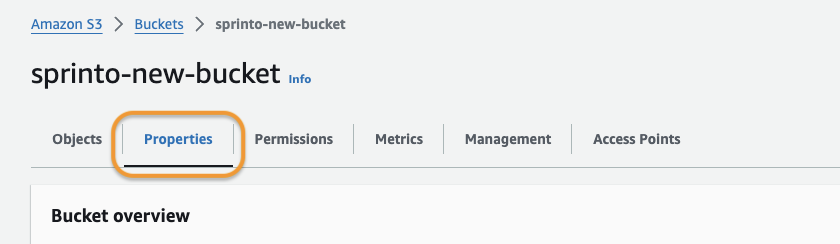
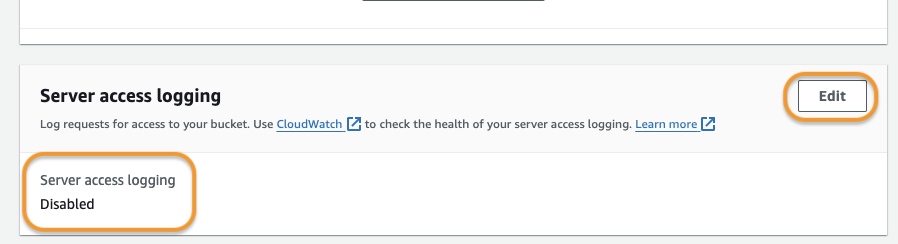
4. Select the Properties tab and scroll down to the Server access logging section.
5. Ensure the Server access logging is Enabled. If it is Disabled, click Edit and enable it.
6. Select a Destination S3 bucket and Log object key format.
7. Click Save Changes to apply the changes.
8. Repeat the above steps and enable Server access logging on every critical S3 bucket.
Sprinto will detect the configuration change and set the check status to "Passing."
Please contact [Sprinto support](mailto:www.support@gmail.com) if you have any queries related to Sprinto check or need any assistance.
---
# Agent Instructions
This documentation is published with GitBook. GitBook is the documentation platform designed so that both humans and AI agents can read, navigate, and reason over technical content effectively. Learn more at gitbook.com.
## Querying This Documentation
If you need additional information that is not directly available in this page, you can query the documentation dynamically by asking a question.
Perform an HTTP GET request on the current page URL with the `ask` query parameter, and the optional `goal` query parameter:
```
GET https://docs.sprinto.com/monitors/audit-logs-and-evidence-trails/how-to-resolve-sprinto-check-for-enabling-server-access-logs-on-aws-s3.md?ask=&goal=
```
`ask` is the immediate question: it should be specific, self-contained, and written in natural language.
`goal` is optional and describes the broader end goal you are ultimately trying to accomplish on behalf of the user. GitBook uses it to tailor the answer towards what is most useful for that goal.
The response will contain a direct answer to the question and relevant excerpts and sources from the documentation.
Use this mechanism when the answer is not explicitly present in the current page, you need clarification or additional context, or you want to retrieve related documentation sections.