# Xero Integration

The Xero integration in Sprinto enables you to monitor and manage user access to your accounting system for compliance purposes.

Sprinto connects to Xero via **Truto**, a secure third-party integration provider, to fetch user access data and automate access-related compliance checks.

This integration helps you:

* Track who has access to Xero
* Identify unauthorised or stale access
* Ensure access is removed for offboarded employees
* Maintain compliance with frameworks such as SOC 2 and ISO 27001

***

### How it works

Sprinto integrates with Xero using a **Truto-managed OAuth connection**.

1. You initiate the connection from Sprinto.
2. Authentication and authorisation are handled via Truto.
3. Truto securely connects to Xero and retrieves user access data.
4. Sprinto stores only the connection reference (not raw credentials).
5. User and access data is periodically synced for compliance monitoring.

Sprinto uses this data to:

* Run access reviews
* Track user roles and permissions
* Trigger alerts for non-compliant access scenarios

### Sprinto checks for Xero <a href="#sprinto-checks-for-xero" id="sprinto-checks-for-xero"></a>

Below is the list of checks available on Sprinto for Xero

<table><thead><tr><th width="563.3828125">Sprinto check</th><th>Reference procedure</th></tr></thead><tbody><tr><td>User should be identified</td><td><a href="../../data-library/access/dashboard-actions/view-and-map-staff-access">How to fix</a></td></tr><tr><td>Xero access should be removed for offboarded user</td><td><a href="../../monitors/authentication-and-access-monitors/resolve-sprinto-check-for-removing-access-for-offboarded-users">How to fix</a></td></tr><tr><td>Critical system access control should be configured</td><td>​<a href="https://app.gitbook.com/o/3Y6icP5z46IeflA3QtMY/s/Esyn5VMU6e0OyGjRtKgx/~/changes/103/data-library/access/dashboard-actions/view-and-map-staff-access">How to fix</a>​</td></tr><tr><td><p>User access to Critical System should be valid</p><div data-gb-custom-block data-tag="hint" data-style="info" class="hint hint-info"><p>The user access to the critical system becomes valid if the respective Org role is added for the system.</p></div></td><td>​<a href="https://app.gitbook.com/o/3Y6icP5z46IeflA3QtMY/s/Esyn5VMU6e0OyGjRtKgx/~/changes/103/data-library/access/dashboard-actions/view-and-map-staff-access">How to fix</a>​</td></tr></tbody></table>

### Prerequisites

Before connecting Xero, ensure the following:

* You have an active Xero subscription.
* You have **admin access** (or equivalent permissions) in Xero.
* Pop-ups are enabled in your browser.
* You have access to create or manage integrations (if using client credentials flow).

***

### Permissions and access

#### Permissions required

Sprinto requires **read-only access** to Xero data.

Typical access includes:

* User directory
* Roles and permissions
* Organisation access details

#### OAuth scopes (managed via Truto)

* `accounting.settings.read`
* `accounting.contacts.read`
* `accounting.reports.read` (if applicable)
* `openid`, `profile`, `email`, `offline_access`

#### Access requirements

* Xero admin or user with user management permissions
* Ability to authorise integrations

***

### Features

The Xero integration enables:

* **Access visibility**\
  View all users with access to Xero.
* **Access reviews**\
  Periodically review and validate user access.
* **Offboarding compliance**\
  Ensure access is revoked when employees leave.
* **Role tracking**\
  Monitor user roles and permission levels.
* **Automated evidence collection**\
  Capture audit-ready data for compliance frameworks.

***

### Use cases

<table><thead><tr><th width="240.953125">Use case</th><th width="434.453125">Description</th></tr></thead><tbody><tr><td>Access reviews</td><td>Verify that only authorised users have access to Xero</td></tr><tr><td>Offboarding checks</td><td>Ensure terminated employees do not retain access</td></tr><tr><td>Audit readiness</td><td>Provide evidence of access controls during audits</td></tr><tr><td>Least privilege enforcement</td><td>Identify users with excessive permissions</td></tr></tbody></table>

***

### Set up Xero integration

#### Step 1: Navigate to Xero integration

1. Log in to the Sprinto dashboard.
2. Go to **Settings → Integrations**.
3. In the **All** tab, search for **Xero**.
4. Click **Connect**.

<figure><img src="https://3220032727-files.gitbook.io/~/files/v0/b/gitbook-x-prod.appspot.com/o/spaces%2FEsyn5VMU6e0OyGjRtKgx%2Fuploads%2FHmYqBUVRiI0WyIRqR62y%2FScreenshot%202026-04-09%20at%2015.08.12.png?alt=media&#x26;token=8db3a78f-9c1c-453f-82b8-6eeb81652011" alt="" width="563"><figcaption></figcaption></figure>

***

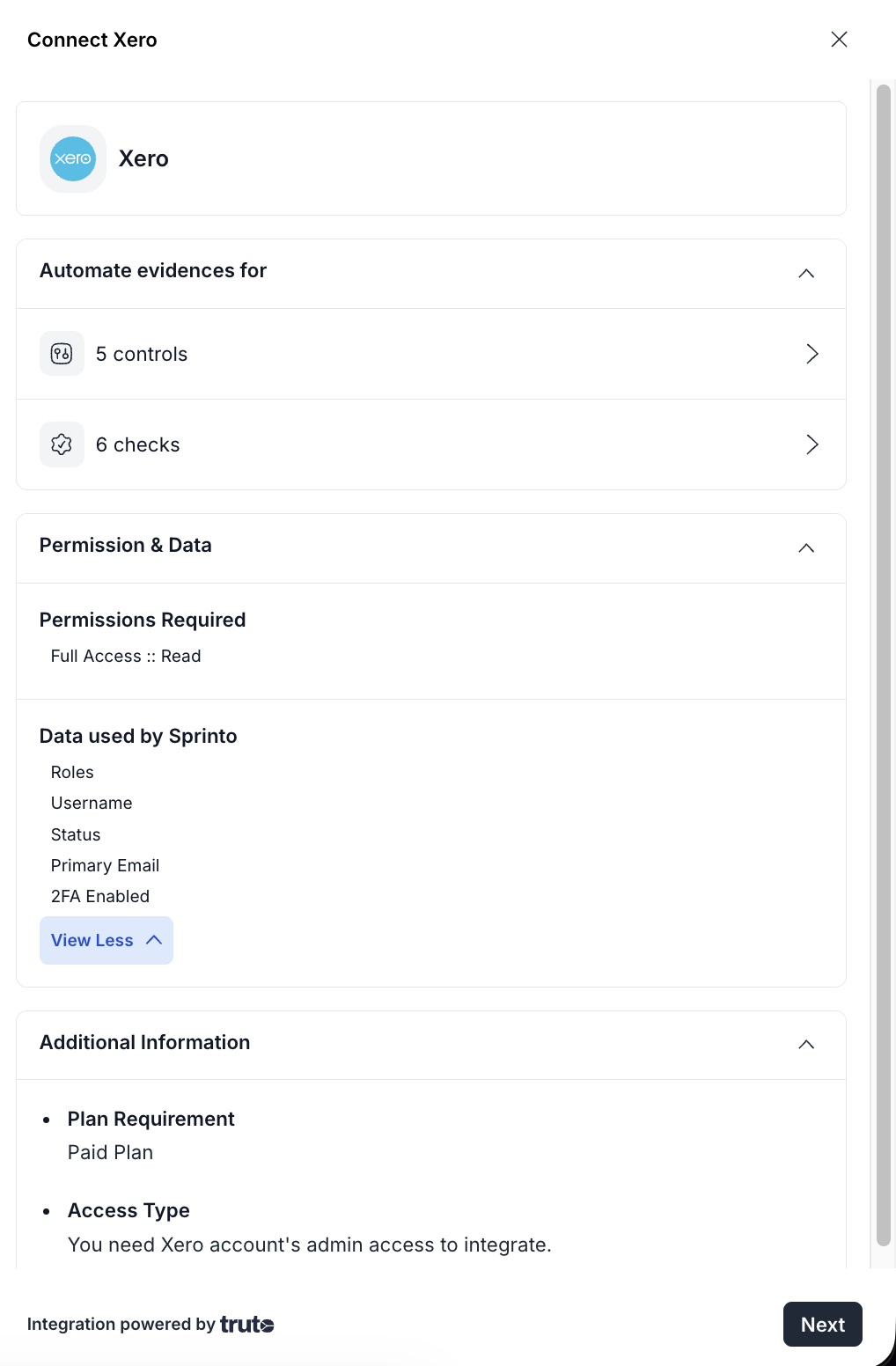
#### Step 2: Review permissions and data access

A drawer opens displaying:

* Controls and checks automated
* Permissions required (read-only access)
* Data collected by Sprinto:
  * Roles
  * Username
  * Status
  * Primary email
  * 2FA status

Review the details and click **Next**.

<figure><img src="https://3220032727-files.gitbook.io/~/files/v0/b/gitbook-x-prod.appspot.com/o/spaces%2FEsyn5VMU6e0OyGjRtKgx%2Fuploads%2Fj4simlBouDMVQ7NOEDJW%2FScreenshot%202026-04-09%20at%2015.10.58.png?alt=media&#x26;token=46ccf64d-eec2-4c3e-bfed-3c2622cd03d6" alt="" width="375"><figcaption></figcaption></figure>

***

#### Step 3: Confirm setup requirements

In the setup drawer:

1. Review the integration steps.
2. Select **I have admin access to my Xero account**.
3. Click **Connect to Xero**.

<figure><img src="https://3220032727-files.gitbook.io/~/files/v0/b/gitbook-x-prod.appspot.com/o/spaces%2FEsyn5VMU6e0OyGjRtKgx%2Fuploads%2FXjYksfz7HH2bJ2Db6bhC%2FScreenshot%202026-04-09%20at%2015.11.31.png?alt=media&#x26;token=666516ea-a537-4e57-8e6f-92d3947ae7e8" alt="" width="375"><figcaption></figcaption></figure>

***

#### Step 4: Enter credentials and authorise

A pop-up appears to complete authentication.

1. Review the required permissions.
2. Enter your **Client ID** & **Client Secret.** [Know more](https://truto.notion.site/Xero-208ac512f5a5807bac41ce4dc2045ea1) about how to retrieve your Client ID & Client Secret.
3. Click **Connect**.

<figure><img src="https://3220032727-files.gitbook.io/~/files/v0/b/gitbook-x-prod.appspot.com/o/spaces%2FEsyn5VMU6e0OyGjRtKgx%2Fuploads%2FuvlDPbrkopdLe8yAIRSw%2FScreenshot%202026-04-09%20at%2015.15.08.png?alt=media&#x26;token=b32dd93b-1d91-44a5-b060-9f9cb89d579a" alt="" width="375"><figcaption></figcaption></figure>

Once completed, the integration is established.

***

### Post-connection flow

After connecting Xero:

* Sprinto automatically initiates a **user sync**.
* Xero can be added as a **critical system** for access monitoring.
* Access review workflows become available.
* Offboarding checks are activated to ensure access removal.

You can verify the connection under:

* **Data Library → Access**

***

### Troubleshooting

#### Authentication issues

<table><thead><tr><th width="213.4921875">Issue</th><th width="433.625">Resolution</th></tr></thead><tbody><tr><td>Invalid credentials</td><td>Verify Client ID and Client Secret</td></tr><tr><td>Expired or invalid token</td><td>Reconnect the integration</td></tr><tr><td>Connection failure</td><td>Retry authentication and ensure pop-ups are enabled</td></tr></tbody></table>

***

#### Permission issues

<table><thead><tr><th width="264.49609375">Issue</th><th width="360.19921875">Resolution</th></tr></thead><tbody><tr><td>Insufficient permissions</td><td>Ensure the user has admin access in Xero</td></tr><tr><td>Role changed after connection</td><td>Reconnect using an admin account</td></tr></tbody></table>

***

#### API and connection errors

<table><thead><tr><th width="251.74609375">Issue</th><th width="371.4453125">Resolution</th></tr></thead><tbody><tr><td>401 Unauthorized</td><td>Re-authenticate the integration</td></tr><tr><td>403 Forbidden</td><td>Verify admin permissions in Xero</td></tr><tr><td>Connection validation failure</td><td>Reconnect the integration</td></tr><tr><td>Rate limiting</td><td>Retry after some time (handled automatically)</td></tr></tbody></table>

***

#### Additional considerations

* Integration uses **Truto**, so authentication is managed externally.
* Sprinto stores only connection metadata, not sensitive credentials.
* Rate limits:
  * Truto: 50 requests per 10 seconds
  * Sprinto: 200 requests per 10 seconds (aggregated)