# Spring Verify Integration

Spring Verify is a background verification service that enables organisations to conduct employee screening and verification checks required for compliance frameworks such as SOC 2 and ISO 27001.

Integrating Spring Verify with Sprinto allows you to automate the collection, mapping, and monitoring of background verification (BGV) data for employees.

***

### How it works

Sprinto connects to Spring Verify to fetch employee verification data and continuously evaluates compliance.

* Retrieves verification data from Spring Verify.
* Maps employees using email identifiers.
* Evaluates verification status against compliance requirements.
* Flags missing or incomplete verifications as compliance gaps.
* Automatically updates checks when verification is completed.

***

### Features

* Automated background verification tracking
* Continuous compliance monitoring
* Region-specific integration support (India and US)
* Automatic mapping of verification reports to employees
* Real-time compliance status updates

#### &#x20;Sprinto checks for Spring Verify integration <a href="#sprinto-checks-for-spring-verify-integration" id="sprinto-checks-for-spring-verify-integration"></a>

Following are the Sprinto checks available for Spring Verify integration:

<table><thead><tr><th width="156.28125">Sprinto check</th><th>Required action</th></tr></thead><tbody><tr><td>Background check via Spring Verify should be completed</td><td><p>This check activates against a staff member if no background verification report is detected.</p><p>To fix this check, complete the background verification for the respective staff member on the integrated service provider platform. Once done, Sprinto detects the changes and sets the check status to “Passing.”</p></td></tr></tbody></table>

### Prerequisites

* Administrator access to your Spring Verify account
* Administrator access to Sprinto
* Valid credentials based on region:
  * API key (India)
  * Admin email and password (US)

***

### What data does Sprinto collect?

Sprinto collects the following data from Spring Verify:

* Employee identifiers (name, email)
* Background verification (BGV) status
* Verification package/status details

This data is used to map employees and evaluate their compliance status.

***

### Permissions required

#### India region

* API key with read access to:
  * Candidate details
  * Verification packages
* No specific role requirement (API key-based access)

#### US region

* Admin email and password
* Admin-level access required
* Read access to employee and company data

***

### Technical details

#### Integration type

Background verification (BGV)

#### Regions supported

* India (Spring Verify API)
* US (Bilic AI platform)

***

#### Authentication methods

**India**

* Method: API key (Bearer token)
* Header-based authentication
* API key entered directly in Sprinto

**US**

* Method: Email and password
* Authentication flow:
  1. Login with credentials.
  2. Generate access token.
  3. Use token for subsequent API calls.
* Password is hashed using SHA256 before transmission.

***

#### APIs used

**India**

* Bulk candidate reports
* Candidate lookup by email
* Account validation endpoint

**US**

* Authentication endpoint
* Employee list retrieval
* Employee lookup by ID
* Company validation endpoint

***

#### Data mapping

Sprinto maps Spring Verify fields differently based on region:

* Employee identification via email
* Status fields mapped to Sprinto compliance states
* Unknown or unsupported statuses are treated as non-compliant

***

#### Sync behaviour

* Initial sync: 15–20 minutes
* Full evaluation: May take a few hours
* Supports:
  * Full refresh (all users)
  * Single-user refresh (manual trigger)

***

#### Connection validation

* India: Account details API
* US: Company details API

Failed validation results in connection failure.

***

### Connect Spring Verify to Sprinto

Follow these steps:

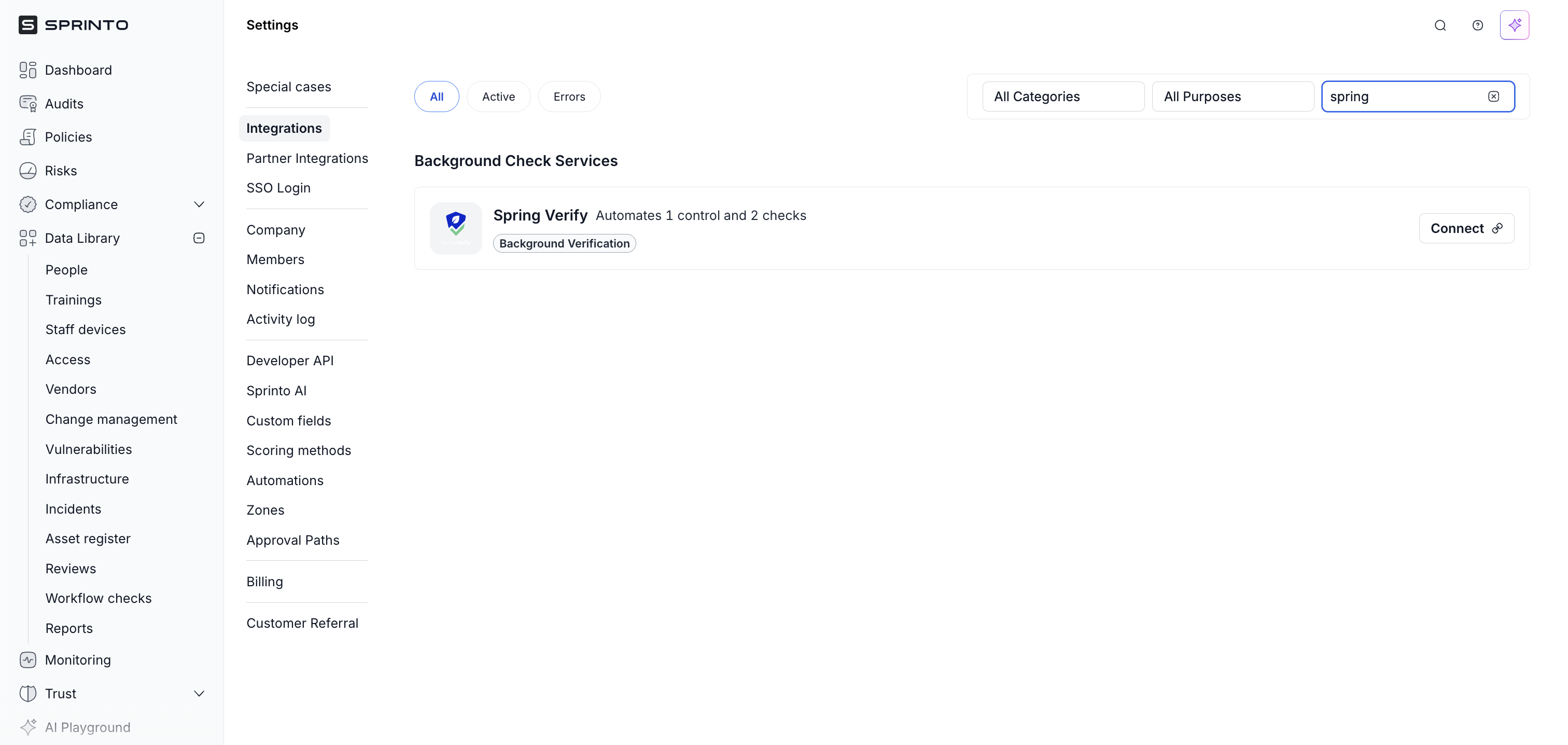
1. Log in to the Sprinto dashboard.
2. Navigate to **Settings → Integrations.**
3. In the **All** tab, search for **Spring Verify.**
4. Click **Connect.**

<figure><img src="https://3220032727-files.gitbook.io/~/files/v0/b/gitbook-x-prod.appspot.com/o/spaces%2FEsyn5VMU6e0OyGjRtKgx%2Fuploads%2F7lzdwNcpLbW8Ngqm45pM%2FScreenshot%202026-04-08%20at%2011.10.49.png?alt=media&#x26;token=44fd82ac-c0de-47c8-862d-5a91d2871f02" alt="" width="563"><figcaption></figcaption></figure>

***

#### Step 1: Review permissions

1. Review permissions and data usage.
2. Click **Next.**

<figure><img src="https://3220032727-files.gitbook.io/~/files/v0/b/gitbook-x-prod.appspot.com/o/spaces%2FEsyn5VMU6e0OyGjRtKgx%2Fuploads%2FZPow4MsZj9ENKSiGSCzE%2FScreenshot%202026-04-08%20at%2011.11.49.png?alt=media&#x26;token=9585127a-4a4c-436a-8417-4bcb033f9eae" alt="" width="375"><figcaption></figcaption></figure>

***

#### Step 2: Choose region and authenticate

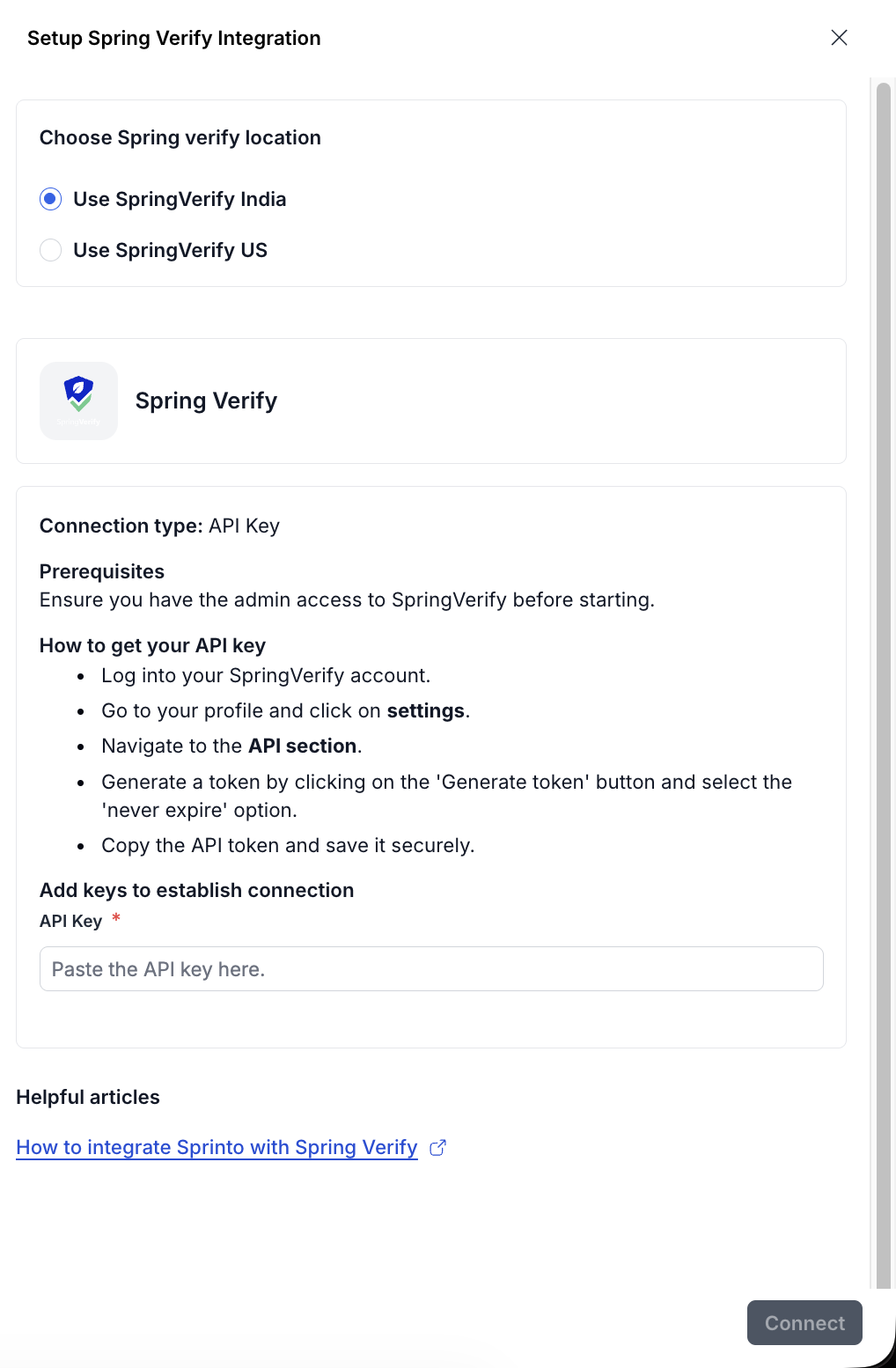
**Option A: Spring Verify India (API key).**

1. Select the **Use Spring Verify India** check bo&#x78;**.**
2. Generate an API key from Spring Verify. [Know more](https://support.springworks.in/portal/en/kb/articles/how-to-generate-an-api-key-on-springverify-portal) about how to generate an API key.
3. Enter the API key.
4. Click **Connect.**

<figure><img src="https://3220032727-files.gitbook.io/~/files/v0/b/gitbook-x-prod.appspot.com/o/spaces%2FEsyn5VMU6e0OyGjRtKgx%2Fuploads%2FKsyyCf9HmzCbNaMR2jZe%2FScreenshot%202026-04-08%20at%2011.13.36.png?alt=media&#x26;token=f801b231-d9b7-4056-bb94-6f422887f54a" alt="" width="375"><figcaption></figcaption></figure>

***

**Option B: Spring Verify US (Admin credentials)**

1. Select the **Use Spring Verify US** check bo&#x78;**.**
2. Enter the **Admin email** & **Password**.
3. Click **Connect.**

<figure><img src="https://3220032727-files.gitbook.io/~/files/v0/b/gitbook-x-prod.appspot.com/o/spaces%2FEsyn5VMU6e0OyGjRtKgx%2Fuploads%2F2aCpYorUc8j7btDZD5D4%2FScreenshot%202026-04-08%20at%2011.16.00.png?alt=media&#x26;token=3d2652d6-ff99-4e34-aca1-8f066bcafb89" alt="" width="375"><figcaption></figcaption></figure>

Once completed, Sprinto establishes the connection and initiates data sync.

***

### Post-connection setup

After connecting:

1. Navigate to **Data Library → People → Configuration.**
2. Click **Manage** next to **Background verifications.**

<figure><img src="https://3220032727-files.gitbook.io/~/files/v0/b/gitbook-x-prod.appspot.com/o/spaces%2FEsyn5VMU6e0OyGjRtKgx%2Fuploads%2FD4ZPLgWowi5XHhsN23bC%2FScreenshot%202026-04-07%20at%2012.51.45.png?alt=media&#x26;token=56349551-8dd2-4f4d-94d5-704ab02a82e4" alt="" width="563"><figcaption></figcaption></figure>

3. Select **Automate via BGV provider.**
4. Select **Spring Verify** and click **Add.**

Sprinto will begin syncing background verification data.

***

### Data sync and behaviour

* Automatic sync starts after connection.
* Initial data appears within 15–20 minutes.
* Compliance evaluation may take a few hours.

To manually refresh:

* Go to **Data Library → People → Configuration.**
* Click **Manage.**
* Trigger refresh.

***

### Error handling and troubleshooting

#### Common issues

* Invalid API key (India)
* Incorrect credentials (US)
* Non-admin access (US)
* Incorrect region selection

#### Resolution

* Verify credentials and permissions
* Ensure correct region is selected
* Retry connection

Failed authentication updates the connection status to **Failed**.

***

### Additional notes

* Sprinto treats unknown verification statuses as non-compliant.
* Ensure employee emails match across Sprinto and Spring Verify.
* Integration uses a flow-based sync architecture for reliability.
* Supports both full and incremental refresh workflows.

***

### Support

Please contact [Sprinto Support](mailto:www.support@sprinto.com) If you have any queries related to the integration or need any assistance.