# Monday Integration

Monday is a cloud-based work operating system where teams can manage their projects, tasks, and workflows. It offers features such as customizable boards, task assignments, progress tracking, file sharing, and integrations with various other tools and platforms.

### How does this integration help Sprinto <a href="#how-does-this-integration-help-sprinto" id="how-does-this-integration-help-sprinto"></a>

The integration primarily helps Sprinto retrieve the user account details like user name, email address, role, etc. It helps Sprinto to map and check if the user with access offboards the organization. The org role information also helps Sprinto ensure only the configured valid roles access the system.

#### Sprinto checks for Monday <a href="#sprinto-checks-for-monday" id="sprinto-checks-for-monday"></a>

Following are the available Sprinto checks for Monday integration:

<table><thead><tr><th width="435.76171875">Sprinto check</th><th>Reference procedure</th></tr></thead><tbody><tr><td><strong>User should be identified</strong></td><td><a href="../../data-library/access/dashboard-actions/view-and-map-staff-access">How to fix</a></td></tr><tr><td><strong>Monday access should be removed for offboarded user</strong></td><td><a href="../../data-library/people/dashboard-actions/manage-staff-and-organisational-configuration">How to fix</a></td></tr><tr><td><strong>Critical system access control should be configured</strong></td><td><a href="../../data-library/access/dashboard-actions/view-and-map-staff-access">How to fix</a></td></tr><tr><td><strong>User access to Critical System should be valid</strong></td><td><a href="../../data-library/access/dashboard-actions/view-and-map-staff-access">How to fix</a><a href="https://sprinto.freshdesk.com/support/solutions/articles/72000606015-how-to-define-critical-system-user-access-mcas-on-sprinto-"><br></a>Note: The user access to the critical system becomes valid if the respective Org role is added to the system. </td></tr></tbody></table>

#### Before you begin

* Log in to Sprinto as administrator.
* Ensure you have “Admin” access on the Monday account you want to integrate.
* Sprinto uses [Truto.one](https://truto.one/) as the integration partner to build this integration.\*\*\*\*

### Integrate Sprinto with Monday <a href="#integrate-sprinto-with-monday" id="integrate-sprinto-with-monday"></a>

1. Integrate Monday on Sprinto.
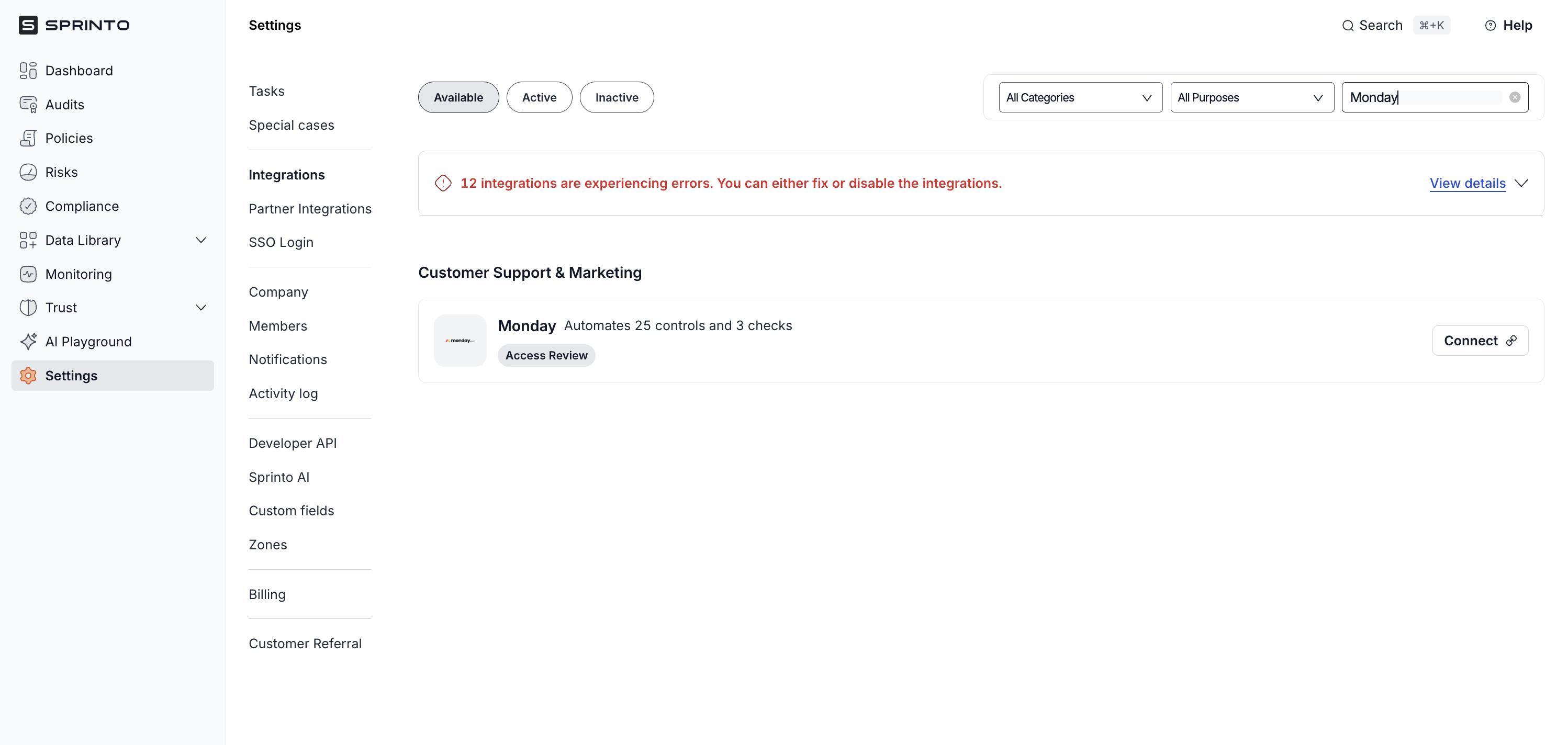
   * Go to Settings > Integrations > Available, and click Connect next to Monday.

     <figure><img src="https://3220032727-files.gitbook.io/~/files/v0/b/gitbook-x-prod.appspot.com/o/spaces%2FEsyn5VMU6e0OyGjRtKgx%2Fuploads%2FFJoAADzuA6buxVmHeDRe%2FScreenshot%202025-09-25%20at%2013.39.44.png?alt=media&#x26;token=3757d366-bbef-44c1-b419-99085250d2a1" alt="" width="563"><figcaption></figcaption></figure>
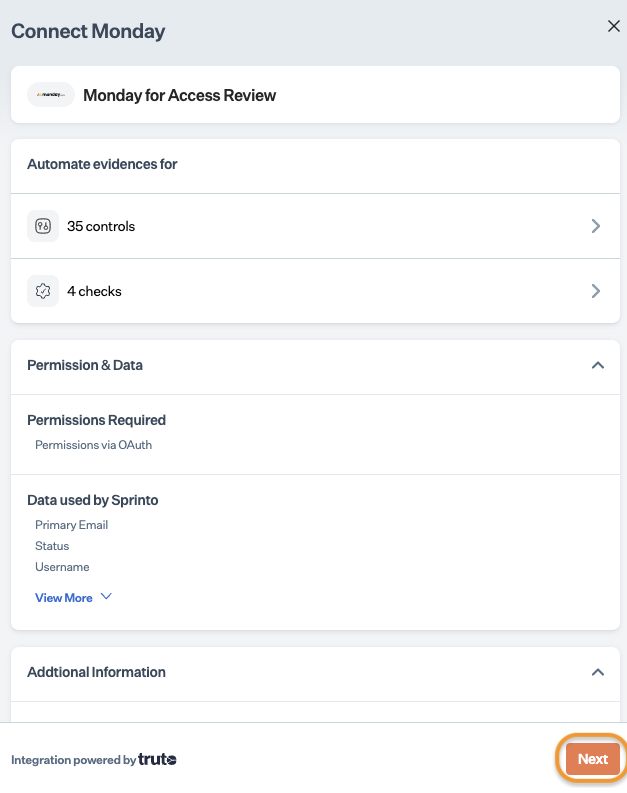
   * Read the on-screen instructions, and click Next.

     <figure><img src="https://s3.amazonaws.com/cdn.freshdesk.com/data/helpdesk/attachments/production/72086123782/original/uEv8dQDkN2wtD65hRaIPmb0zF8a9vpMjwg.png?1708408474" alt="" width="375"><figcaption></figcaption></figure>
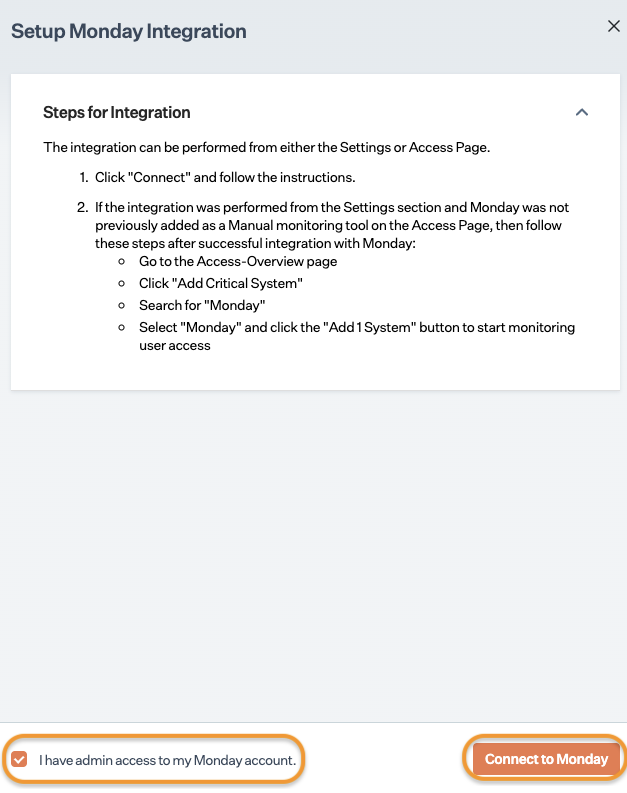
   * On Integration page, select the acknowledgment checkbox and click Connect to Monday.\
     Note: Ensure you have a pop-up window enabled on your browser.

     <figure><img src="https://s3.amazonaws.com/cdn.freshdesk.com/data/helpdesk/attachments/production/72086123759/original/BQljmYjAg52IBnekWJYldTWE4y8e2SaM4w.png?1708408455" alt="" width="375"><figcaption></figcaption></figure>
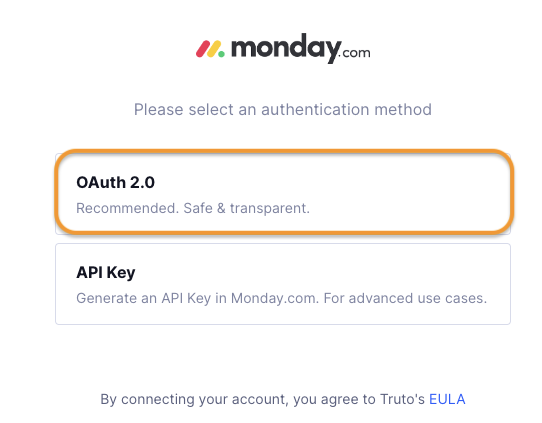
   * On Authentication page, click OAuth 2.O log in option.

     <figure><img src="https://s3.amazonaws.com/cdn.freshdesk.com/data/helpdesk/attachments/production/72086123749/original/LBme6Dtq6r-qUOCZ94h8BKXjxBx12WYMMw.png?1708408434" alt="" width="563"><figcaption></figcaption></figure>
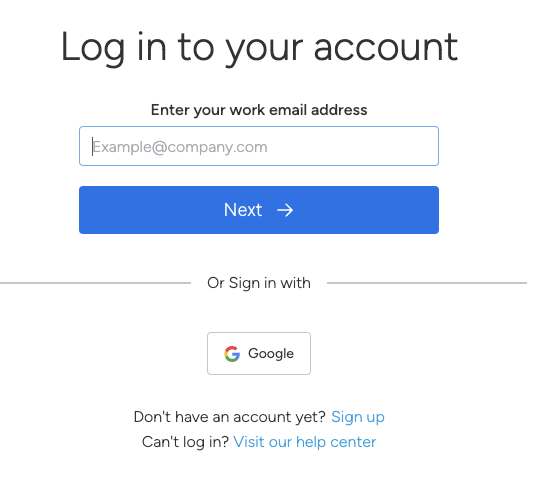
   * Log in to your Monday account using your credentials.

     <figure><img src="https://s3.amazonaws.com/cdn.freshdesk.com/data/helpdesk/attachments/production/72086123722/original/xwsAYYcotfBKoRXILNBohLUNt6EYuT0pjQ.png?1708408412" alt="" width="563"><figcaption></figcaption></figure>
   * Follow the on-screen instructions to grant necessary permissions to Sprinto.
2. Add Monday as a critical system.
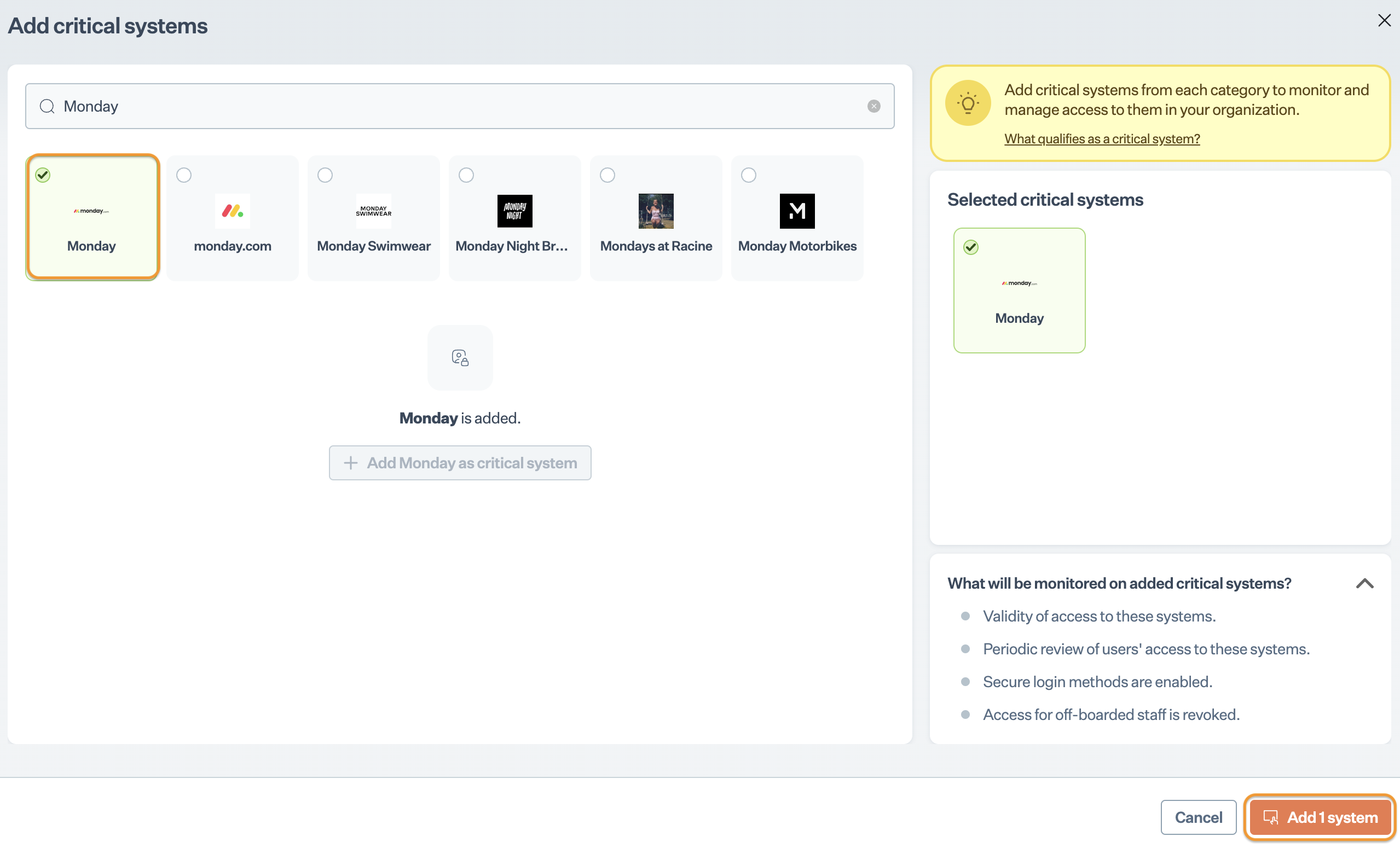
   * On Sprinto app, go to Data Library > Access > Critical systems, and click + Add Critical System.
   * On Add Critical System page, select Monday and click Add System.

     <figure><img src="https://s3.amazonaws.com/cdn.freshdesk.com/data/helpdesk/attachments/production/72086123666/original/6CnCgnfrBraK8Al-E7YXuN-JKTpf0UdExQ.png?1708408351" alt="" width="563"><figcaption></figcaption></figure>
3. Configure valid users for Monday.
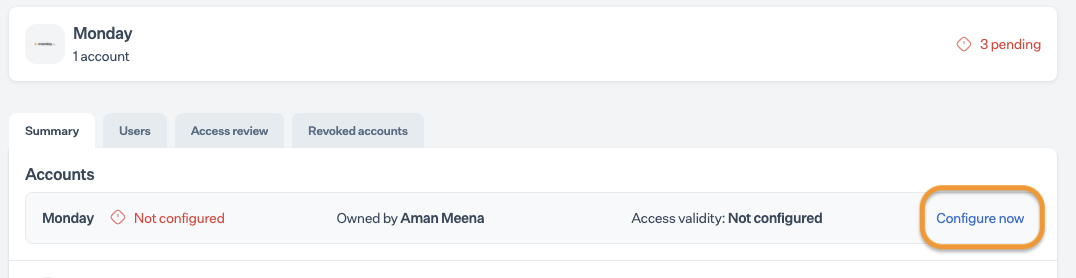
   * Go to Data Library > Access > Critical systems, and select Monday.
   * On the Summary page, click Configure Now next to the Monday account.

     <figure><img src="https://s3.amazonaws.com/cdn.freshdesk.com/data/helpdesk/attachments/production/72086123600/original/yvfLAKL4mOpm1EwdVZQfW3RuPnOlvYTniA.png?1708408309" alt="" width="563"><figcaption></figcaption></figure>
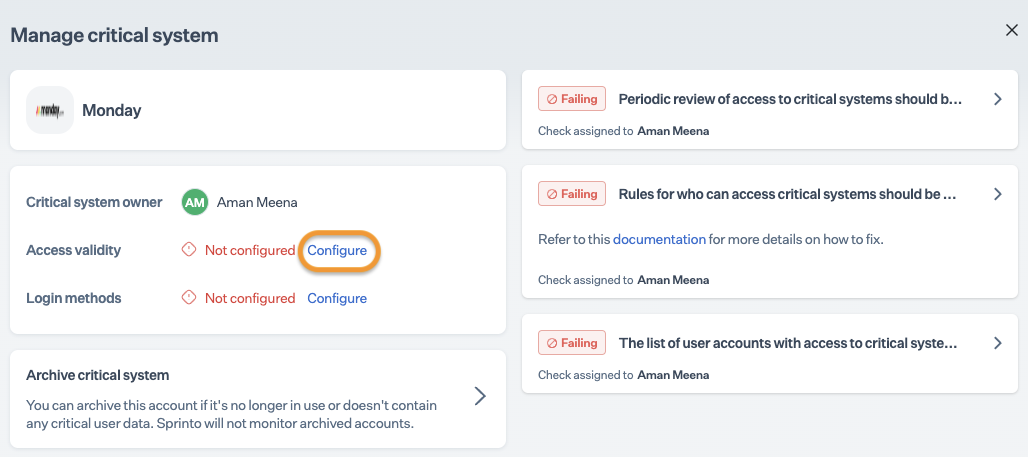
   * On the Manage page, click Configure next to access validity.

     <figure><img src="https://s3.amazonaws.com/cdn.freshdesk.com/data/helpdesk/attachments/production/72086123582/original/hQoX4-TrR4yXHU7VkfpTZJXQVdgBKgZZ3w.png?1708408290" alt="" width="563"><figcaption></figcaption></figure>
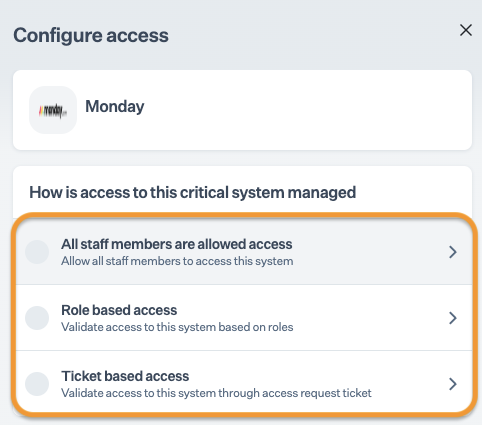
   * Choose one of the options to define valid users based on roles.

     <figure><img src="https://s3.amazonaws.com/cdn.freshdesk.com/data/helpdesk/attachments/production/72086123553/original/MNQQvu4JOtUcv0cBWgoeZGYOyRkP6_ueQg.png?1708408271" alt="" width="563"><figcaption></figcaption></figure>

### Final Step <a href="#final-step" id="final-step"></a>

After completing Step 3, allow 15 to 20 minutes for Sprinto to finish the data syncing process. Sprinto may take a few hours to evaluate the synced data and activate relevant Sprinto checks. If needed, go to Data Library > Access > Critical System to check for pending tasks next Monday.

If you need any assistance with the integration, kindly get in touch with [Sprinto support](mailto:www.support@sprinto.com).