# ManageEngine ServiceDesk Plus Integration (Access Review)

Integrate ManageEngine ServiceDesk Plus with Sprinto to automate access review evidence collection and monitor user access for compliance.

This integration connects Sprinto with ManageEngine ServiceDesk Plus through Truto’s integration platform and syncs user access data such as account status, roles, MFA configuration, and user directory details.

ManageEngine ServiceDesk Plus Access Review is separate from the Incident Management and Ticketing integration.

***

### How It Works

Once connected, Sprinto uses Truto’s unified integration layer to fetch and standardise access review data from ManageEngine ServiceDesk Plus.

Sprinto retrieves user information and continuously monitors access-related controls for compliance.

The integration helps you:

* Monitor user access to ManageEngine ServiceDesk Plus
* Review roles and permission assignments
* Track account activity and status
* Validate MFA or 2FA enforcement
* Automate evidence collection for audits

***

### Permissions Required

Sprinto requires an admin user with full access to connect to ManageEngine ServiceDesk Plus.

The integration uses these permissions to retrieve:

* User accounts with access to ServiceDesk Plus
* User roles and permissions
* Account status (active or inactive)
* 2FA or MFA status

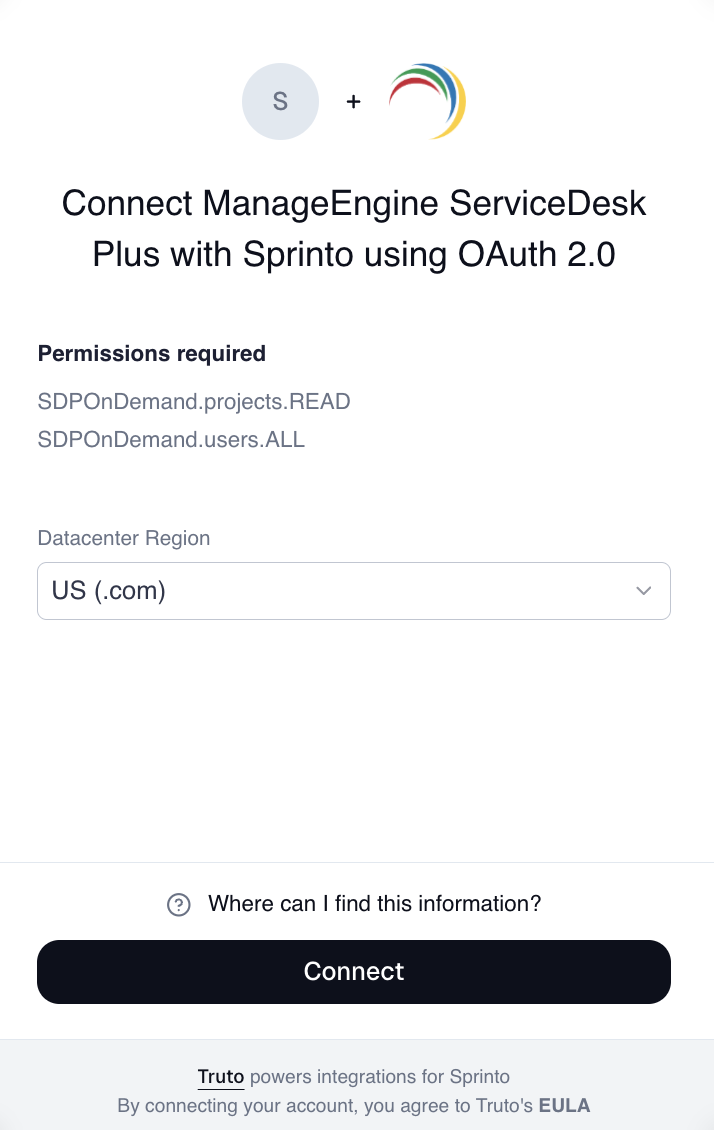
During OAuth authorisation, ManageEngine ServiceDesk Plus grants the following scopes:

* `SDPOnDemand.projects.READ`
* `SDPOnDemand.users.ALL`

***

### Data Used by Sprinto

Sprinto syncs the following information from ManageEngine ServiceDesk Plus:

* Primary email
* Username
* Account status
* Roles and permission levels
* MFA or 2FA status
* User directory information

***

### Authentication Method

ManageEngine ServiceDesk Plus Access Review uses OAuth 2.0 authentication through the Truto integration platform.

### APIs Used by Sprinto

Sprinto uses Truto’s unified APIs to retrieve and maintain user access information.

#### Authentication and Connection

* Token-based authentication through Truto
* Connection validation endpoints

#### User Data APIs

* `GET /unified/user-directory/users` - Retrieves all ServiceDesk Plus users
* `GET /unified/user-directory/users/{id}` - Retrieves detailed information for specific users when required

#### Connection Management

* OAuth credential refresh endpoints for token rotation and session maintenance

***

### What Data Is Synced

Sprinto syncs the following data from ManageEngine ServiceDesk Plus:

<table><thead><tr><th width="161.7421875">Data Type</th><th width="389.37109375">Description</th></tr></thead><tbody><tr><td>Primary Email</td><td>User email address</td></tr><tr><td>Username</td><td>ServiceDesk Plus username</td></tr><tr><td>Status</td><td>Active or inactive account status</td></tr><tr><td>Roles</td><td>Assigned roles and permissions</td></tr><tr><td>MFA/2FA Status</td><td>Whether multi-factor authentication is enabled</td></tr><tr><td>Users</td><td>Full user directory list</td></tr></tbody></table>

***

### Integration Architecture

ManageEngine ServiceDesk Plus Access Review uses Truto as the integration platform.

This means:

* API calls are routed through Truto’s unified API layer.
* Truto manages communication with ManageEngine ServiceDesk Plus APIs.
* Sprinto receives standardised user directory and access data.

***

### Monitors Created

After the integration is connected, Sprinto automatically creates monitors to track access review compliance.

<table><thead><tr><th width="374">Monitor</th><th>Description</th></tr></thead><tbody><tr><td><code>MANAGEENGINE_SERVICEDESK_PLUS_ACCESS_REMOVED_ON_EXIT</code></td><td>Tracks whether users removed from your organisation are removed from ServiceDesk Plus</td></tr><tr><td><code>MANAGEENGINE_SERVICEDESK_PLUS_USER_MFA_ENABLED</code></td><td>Tracks MFA or 2FA enablement for ServiceDesk Plus users</td></tr></tbody></table>

***

### Technical Details

<table><thead><tr><th width="232.62109375">Attribute</th><th width="348.6015625">Value</th></tr></thead><tbody><tr><td>Truto Integration Name</td><td><code>manageenginesdplus</code></td></tr><tr><td>Vendor Name</td><td><code>MANAGEENGINE_SERVICEDESK_PLUS_ACCESS</code></td></tr><tr><td>Category</td><td>Incident Management / Access Review</td></tr><tr><td>Authentication Type</td><td>OAuth 2.0</td></tr><tr><td>Single Connection</td><td>Yes</td></tr></tbody></table>

***

### Prerequisites

Before you connect ManageEngine ServiceDesk Plus to Sprinto, ensure that:

* You have admin access to your ManageEngine ServiceDesk Plus account.
* Your ManageEngine ServiceDesk Plus instance supports OAuth integrations.
* You know your ServiceDesk Plus data centre region.
* You can sign in to your Zoho account associated with ManageEngine ServiceDesk Plus.

***

### Connect ManageEngine ServiceDesk Plus to Sprinto

1. Log in to the Sprinto dashboard.
2. Navigate to **Settings**.
3. Select **Integrations**.
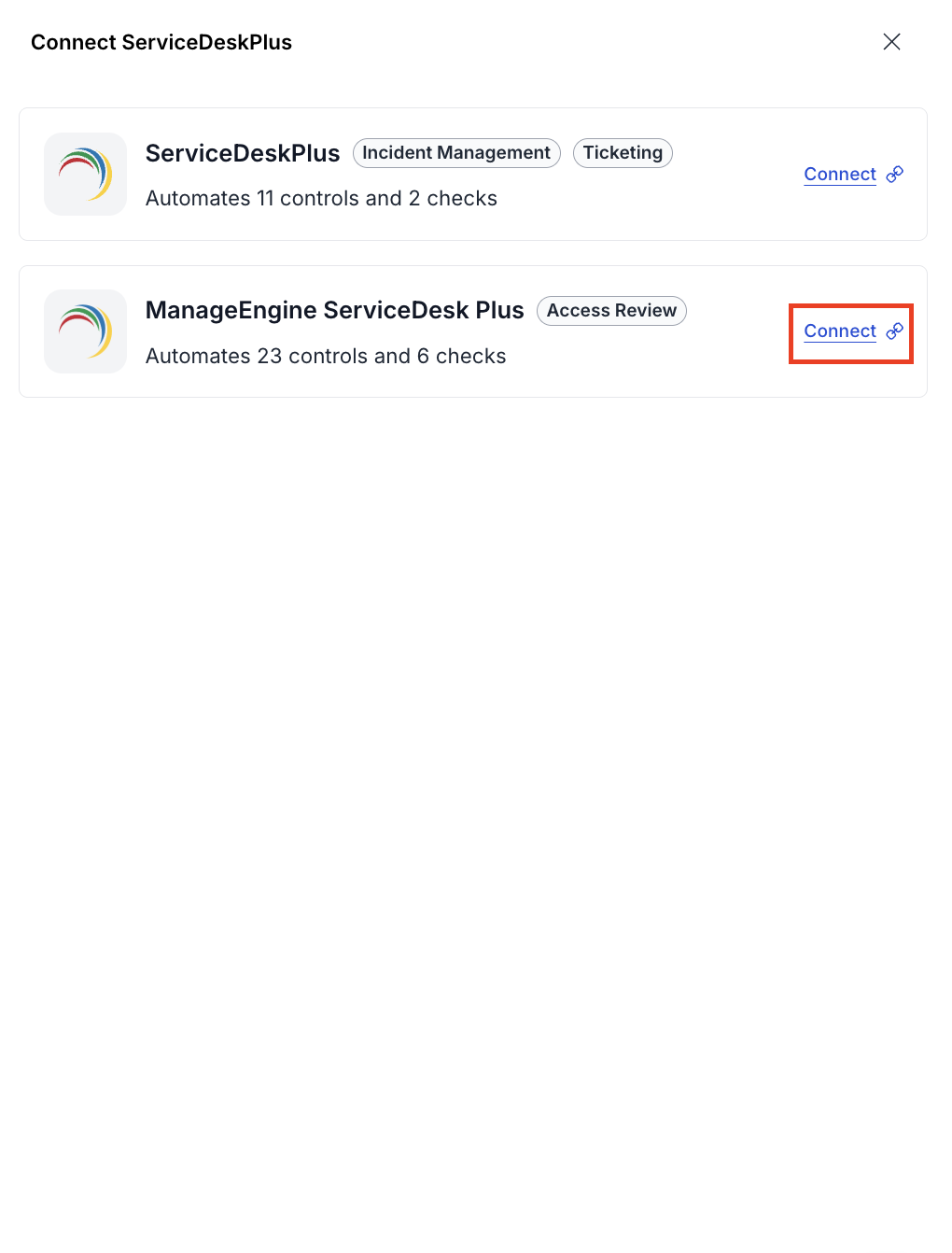
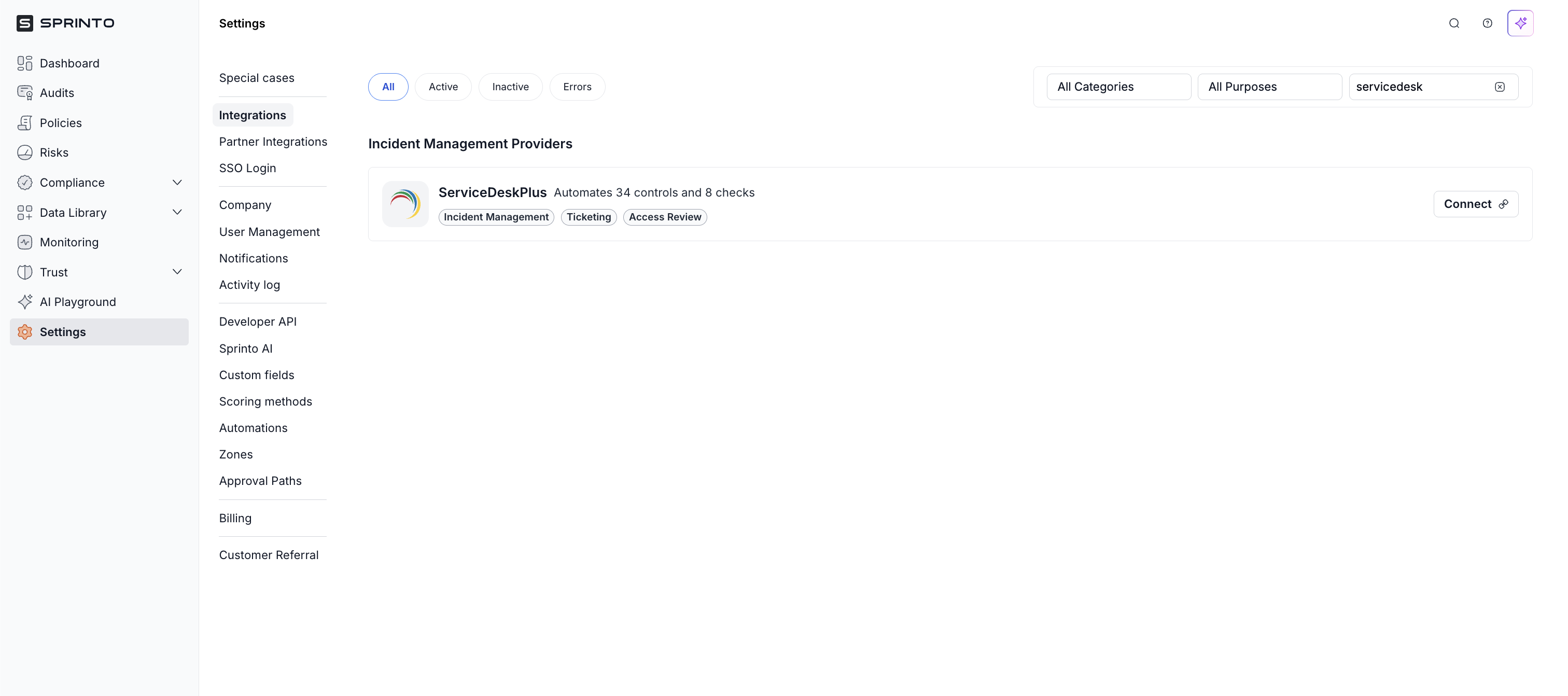
4. In the **All** tab, search for **ServiceDesk Plus**.
5. Locate **ServiceDesk Plus** and click **Connect**.

<figure><img src="https://3220032727-files.gitbook.io/~/files/v0/b/gitbook-x-prod.appspot.com/o/spaces%2FEsyn5VMU6e0OyGjRtKgx%2Fuploads%2FAcaCf9pRt6Ih9U6PX9cF%2FScreenshot%202026-04-30%20at%2012.05.59.png?alt=media&#x26;token=f834f89a-4d61-42d7-9e47-13799c1dedd0" alt="" width="563"><figcaption></figcaption></figure>

6. In the drawer that opens, select **ManageEngine ServiceDesk Plus – Access Review**.
7. Click **Connect** next to the Access Review option.

<figure><img src="https://3220032727-files.gitbook.io/~/files/v0/b/gitbook-x-prod.appspot.com/o/spaces%2FEsyn5VMU6e0OyGjRtKgx%2Fuploads%2FUsRIBopuQSQFsEKqfWIw%2FScreenshot%202026-04-30%20at%2012.07.41.png?alt=media&#x26;token=06d87fe7-ac2d-4b73-bdd2-2f2907a4824b" alt="" width="375"><figcaption></figcaption></figure>

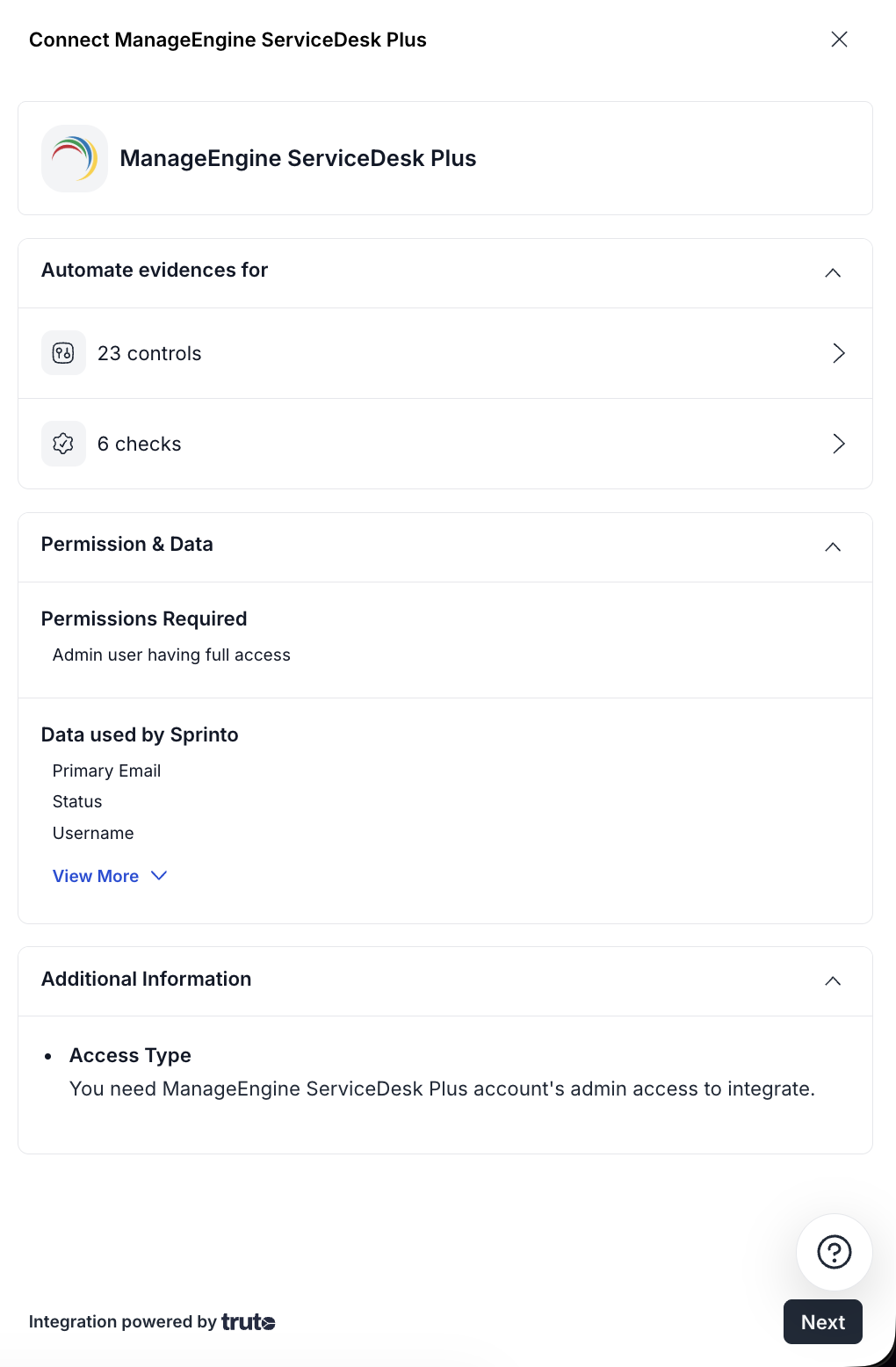
8. Review the permissions required and data used by Sprinto.
9. Click **Next**.

<figure><img src="https://3220032727-files.gitbook.io/~/files/v0/b/gitbook-x-prod.appspot.com/o/spaces%2FEsyn5VMU6e0OyGjRtKgx%2Fuploads%2FSZHtzQ9iKzVwbvS7Urdf%2FScreenshot%202026-04-30%20at%2012.08.43.png?alt=media&#x26;token=09808797-daec-4296-8d20-e3728c68a38b" alt="" width="375"><figcaption></figcaption></figure>

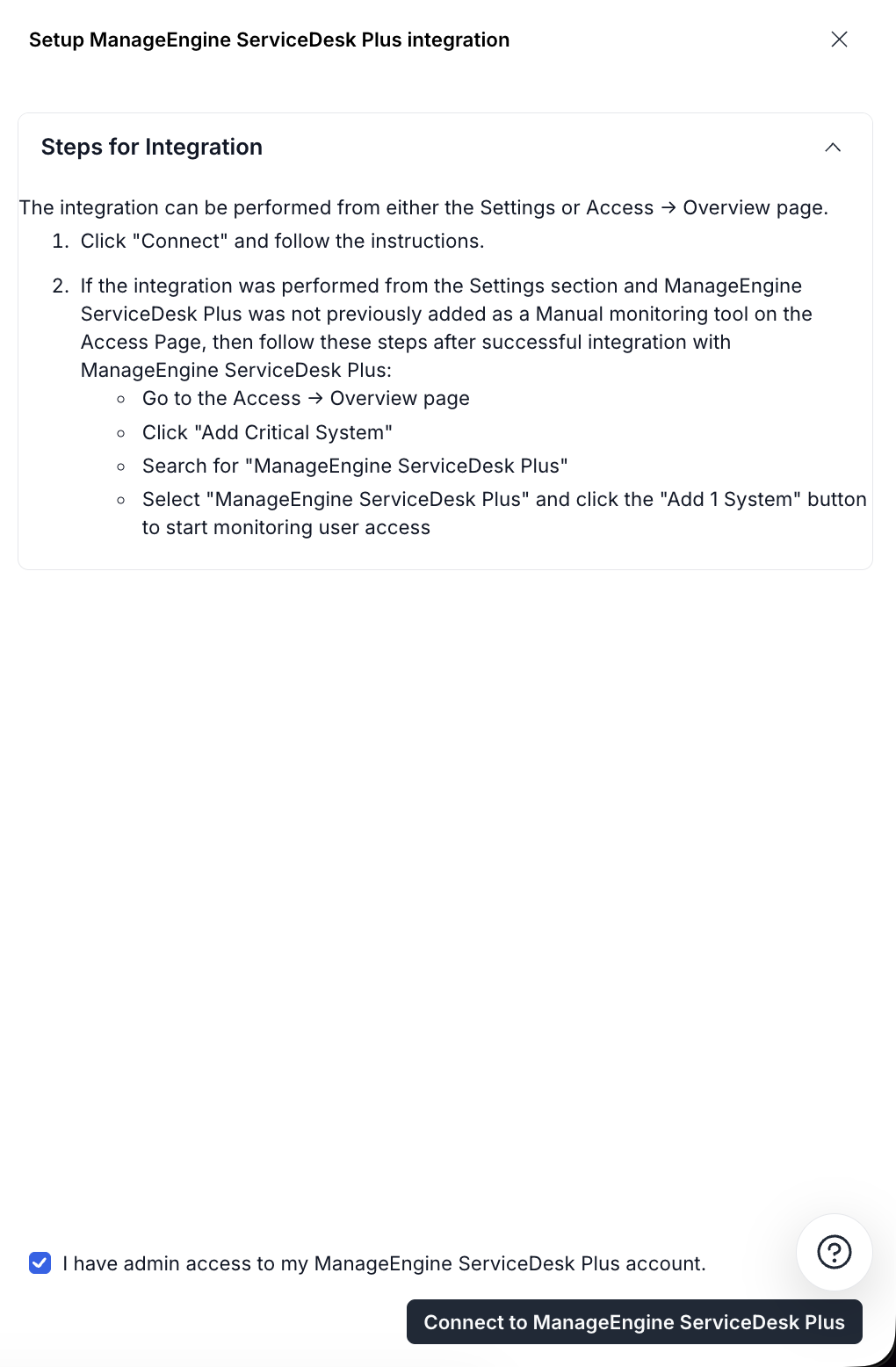
10. Review the integration steps shown in the setup drawer.
11. Select the **I have admin access to my ManageEngine ServiceDesk Plus account** checkbox.
12. Click **Connect to ManageEngine ServiceDesk Plus**.

<figure><img src="https://3220032727-files.gitbook.io/~/files/v0/b/gitbook-x-prod.appspot.com/o/spaces%2FEsyn5VMU6e0OyGjRtKgx%2Fuploads%2FeIowjKKccwN3NPfBYJZD%2FScreenshot%202026-04-30%20at%2012.10.57.png?alt=media&#x26;token=97cbaa1e-241f-4e4b-9884-329b7625b5ad" alt="" width="375"><figcaption></figcaption></figure>

13. In the OAuth connection pop-up, select your **Datacenter Region**. [Know more](https://wiki.truto.one/integration-guides/manageenginesdplus/#finding-your-manageengine-servicedesk-plus-datacenter-region) about where you can find your datacenter region.
14. Click **Connect**.

<figure><img src="https://3220032727-files.gitbook.io/~/files/v0/b/gitbook-x-prod.appspot.com/o/spaces%2FEsyn5VMU6e0OyGjRtKgx%2Fuploads%2FVBOdk5CbnbBJCUc1RtiE%2FScreenshot%202026-04-30%20at%2012.12.57.png?alt=media&#x26;token=a1a01e59-a91e-4da8-aea5-818e1438d599" alt="" width="357"><figcaption></figcaption></figure>

15. Sign in to your Zoho account using your credentials.
16. Follow the on-screen instructions to authorise Sprinto to access your ManageEngine ServiceDesk Plus account.
17. After authorisation is complete, the integration is successfully connected.

***

### Post-Connection Flow

After the integration is connected successfully, Sprinto begins syncing access review data from ManageEngine ServiceDesk Plus.

Sprinto automatically:

* Validates the OAuth connection
* Syncs user directory information
* Retrieves user roles and permission details
* Maps user account status
* Checks MFA or 2FA availability
* Creates access review monitors for compliance tracking

***

### Troubleshooting

#### 1. Connection fails

Possible causes:

* The connected account does not have admin access.
* OAuth authorisation failed.
* OAuth integrations are restricted in your ServiceDesk Plus instance.

Recommended actions:

* Verify that the account used has admin privileges.
* Retry the OAuth sign-in flow.
* Confirm OAuth integrations are allowed in your ServiceDesk Plus environment.

#### 2. No users appear after connecting

Possible causes:

* The connected admin account cannot view all users.
* User directory sync is disabled.

Recommended actions:

* Confirm that the connected account has visibility into all users.
* Verify that user directory sync is enabled in ServiceDesk Plus.

#### 3. Token expiration

Sprinto automatically refreshes OAuth tokens.

If refresh fails:

* Reconnect the integration.
* Complete the OAuth sign-in flow again.

***

### **Support** <a href="#support" id="support"></a>

If you encounter any issues or need assistance with your integration, contact the Sprinto support team at <support@sprinto.com>.


---

# Agent Instructions: Querying This Documentation

If you need additional information that is not directly available in this page, you can query the documentation dynamically by asking a question.

Perform an HTTP GET request on the current page URL with the `ask` query parameter:

```
GET https://docs.sprinto.com/integrations/overview/manageengine-servicedesk-plus-integration-access-review.md?ask=<question>
```

The question should be specific, self-contained, and written in natural language.
The response will contain a direct answer to the question and relevant excerpts and sources from the documentation.

Use this mechanism when the answer is not explicitly present in the current page, you need clarification or additional context, or you want to retrieve related documentation sections.