> For the complete documentation index, see [llms.txt](https://docs.sprinto.com/llms.txt). Markdown versions of documentation pages are available by appending `.md` to page URLs; this page is available as [Markdown](https://docs.sprinto.com/integrations/overview/halo-security-integration.md).

# Halo Security Integration

Halo Security is a comprehensive security platform designed to safeguard digital assets and infrastructure against various threats and vulnerabilities.

### How does this integration help Sprinto <a href="#how-does-this-integration-help-sprinto" id="how-does-this-integration-help-sprinto"></a>

This integration assists Sprinto in retrieving detected vulnerabilities from your Halo Security account. According to data security compliance standards, all identified vulnerabilities must be resolved within the defined Service Level Agreement (SLA). Once a vulnerability is resolved and its status updated in Halo Security, Sprinto detects the changes and updates the Sprinto check status to 'passing' for the resolved vulnerability.

#### Sprinto checks for Halo Security <a href="#sprinto-checks-for-halo-security" id="sprinto-checks-for-halo-security"></a>

Following are the Sprinto checks available for Halo Security:

<table><thead><tr><th width="232.77734375">Sprinto check</th><th>Required action</th></tr></thead><tbody><tr><td><strong>Halo Security vulnerability alert should be resolved within SLA</strong></td><td>There is a current vulnerability in the “Open” status detected on your integrated Halo Security account. Resolve the vulnerability from the source and close the vulnerability from your Halo Security account.</td></tr></tbody></table>

### Before you begin <a href="#before-you-begin" id="before-you-begin"></a>

* Log in on Sprinto as administrator.
* Ensure you have “Admin” access on the Halo Security account you want to integrate.
* Ensure your Halo Security account is on an Enterprise subscription plan to build this integration.

### Integrate Sprinto with Halo Security <a href="#integrate-sprinto-with-halo-security" id="integrate-sprinto-with-halo-security"></a>

1. Get the API key from your Halo Security account.
   * Log in to your[ Halo Security](https://app.halosecurity.com/login?why=403\&re=%2Fuser%2Faccount%2F) account using your credentials or the available Single Sign-On (SSO) option.
   * Click on the profile picture at the top.
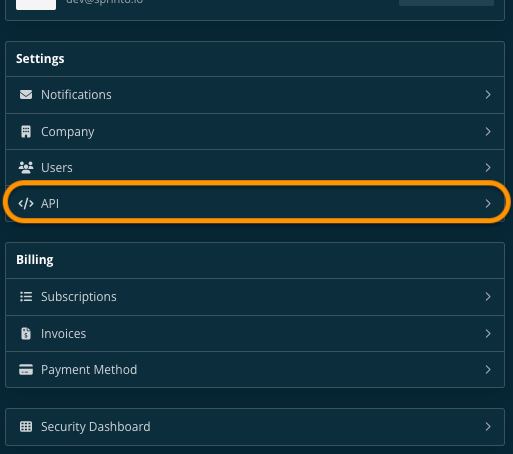
   * On Overview page, click API.<br>

     <figure><img src="https://s3.amazonaws.com/cdn.freshdesk.com/data/helpdesk/attachments/production/72086037857/original/36OdapurlUXq7RsZ7j0OQOifpMxNA1rdgQ.png?1708355298" alt="" width="375"><figcaption></figcaption></figure>
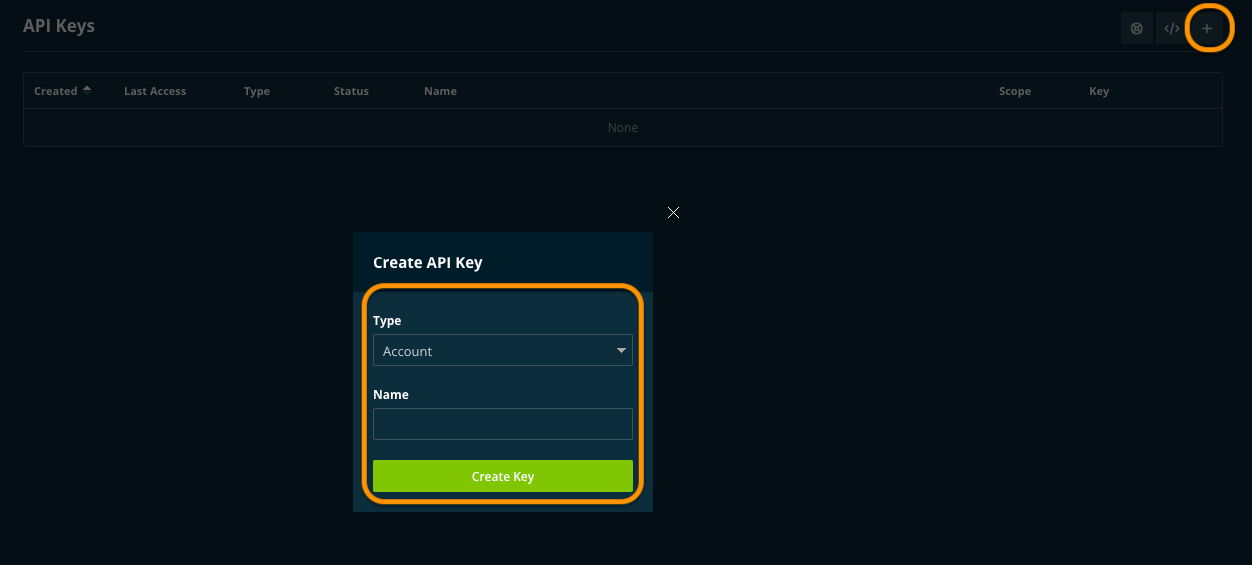
   * Click on + to create a new API token. Fill in the necessary details, and click Create Key.<br>

     <figure><img src="https://s3.amazonaws.com/cdn.freshdesk.com/data/helpdesk/attachments/production/72086037926/original/z1A4J9qs9vQzGErjgnII43QZGBV-Hj9xtA.png?1708355317" alt="" width="563"><figcaption></figcaption></figure>
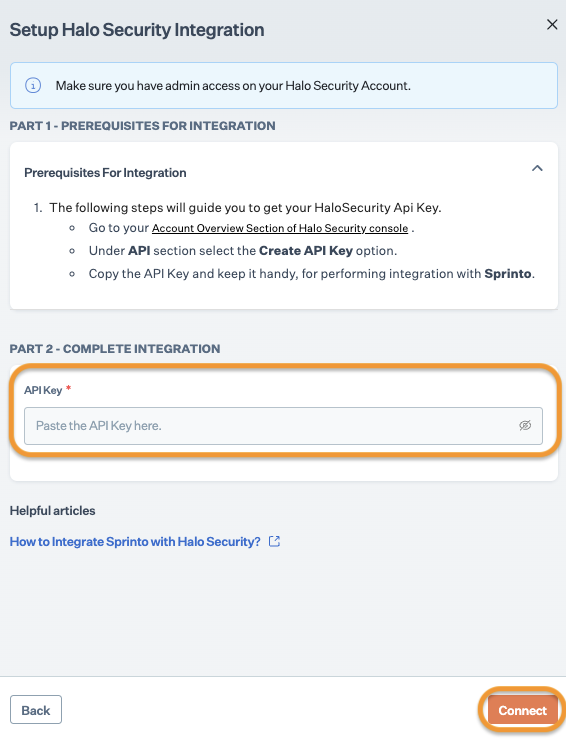
   * Copy the API key and save it securely. We will need this key to build integration on Sprinto.
2. Integrate Halo Security on Sprinto.
   * Go to Settings > Integrations > Available, and click Connect next to Halo Security.

<figure><img src="/files/VehRKIY2z4M05H96ktbY" alt="" width="563"><figcaption></figcaption></figure>

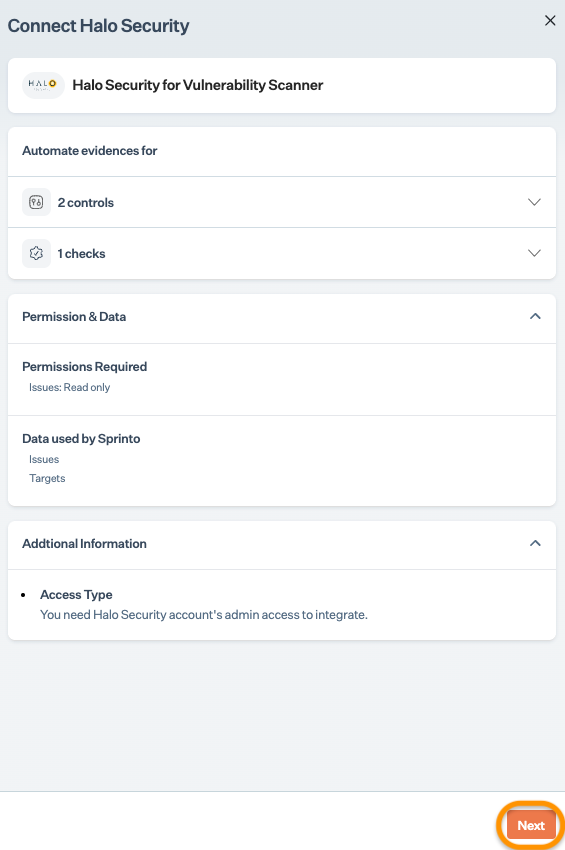
* Read the on-screen instructions, and click Next.<br>

  <figure><img src="https://s3.amazonaws.com/cdn.freshdesk.com/data/helpdesk/attachments/production/72086038051/original/I_wesux-rJyDo0HoPWjspdm7_MCexG5Rpg.png?1708355351" alt="" width="375"><figcaption></figcaption></figure>
* On Integrations page, enter the API key that you copied from Step 1 and click Connect.

  <figure><img src="https://s3.amazonaws.com/cdn.freshdesk.com/data/helpdesk/attachments/production/72086038293/original/vHIsg-yN6i95QgxZZKmdOrHWYv-pYBQmZw.png?1708355447" alt="" width="375"><figcaption></figcaption></figure>

1. Adding Halo Security as a vulnerability scanner on Sprinto.
   * Go to Data Library > Vulnerabilities > Overview, and click + Add Monitoring Source.
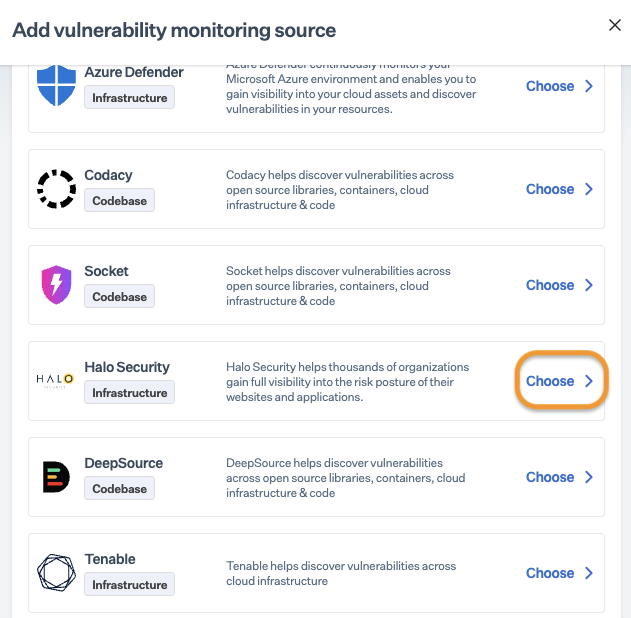
   * On Add Vulnerability monitoring source page, click Choose next to Halo Security.

     <figure><img src="https://s3.amazonaws.com/cdn.freshdesk.com/data/helpdesk/attachments/production/72086038386/original/ENlbR50Ju22uAICXMblcQeEHVOb_-E5Mpg.png?1708355483" alt="" width="563"><figcaption></figcaption></figure>
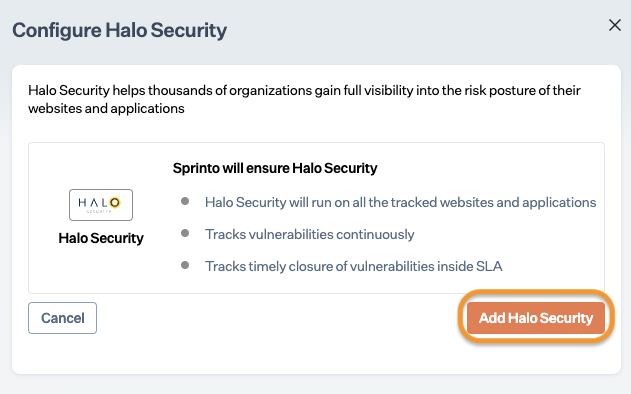
   * On Configure Halo Security page, click Add Halo Security.

     <figure><img src="https://s3.amazonaws.com/cdn.freshdesk.com/data/helpdesk/attachments/production/72086038475/original/a-YgWHARfSMhmjx6S9zcur8cRWZ1W-p1Vw.png?1708355508" alt="" width="563"><figcaption></figcaption></figure>

### Final step <a href="#final-step" id="final-step"></a>

After completing Step 2, allow 15 to 20 minutes for Sprinto to finish the data syncing process. Sprinto may take a few hours to evaluate the synced data and activate relevant Sprinto checks. If needed, go to Data Library > Vulnerabilities and click Halo Security to review the pending Sprinto checks.

If you need any assistance with the integration, kindly get in touch with Sprinto support.


---

# Agent Instructions
This documentation is published with GitBook. GitBook is the documentation platform designed so that both humans and AI agents can read, navigate, and reason over technical content effectively. Learn more at gitbook.com.

## Querying This Documentation
If you need additional information that is not directly available in this page, you can query the documentation dynamically by asking a question.

Perform an HTTP GET request on the current page URL with the `ask` query parameter:

```
GET https://docs.sprinto.com/integrations/overview/halo-security-integration.md?ask=<question>
```

The question should be specific, self-contained, and written in natural language.
The response will contain a direct answer to the question and relevant excerpts and sources from the documentation.

Use this mechanism when the answer is not explicitly present in the current page, you need clarification or additional context, or you want to retrieve related documentation sections.