# Asana (Ticketing System) Integration

The Asana integration allows Sprinto to sync tasks (tickets), projects, and user activity to automate evidence collection for compliance frameworks such as SOC 2 and ISO 27001.

Sprinto uses this integration to:

* Track change management through tickets
* Monitor task lifecycle and approvals
* Validate ownership and accountability
* Capture audit-ready evidence automatically

Asana is connected via a third-party integration provider (MergeDev). Sprinto does not directly connect to Asana APIs.

***

### How it works

Sprinto connects to Asana using MergeDev’s secure OAuth-based integration.

Once connected:

1. Sprinto retrieves tasks (tickets), projects, and users from Asana
2. Projects are mapped as collections within Sprinto
3. Task updates, status changes, and assignments are continuously synced
4. Workflow states are derived from:
   * Project sections (e.g., To Do, In Progress, Done)
   * Completion status (completed/not completed)
5. Task activity (stories/changelog) is tracked for audit evidence

This enables Sprinto to automatically validate compliance requirements tied to ticketing workflows.

***

### Use cases

<table><thead><tr><th width="257.45703125">Use case</th><th width="374.83203125">Description</th></tr></thead><tbody><tr><td>Change management tracking</td><td>Validate that all changes are backed by tickets</td></tr><tr><td>Audit evidence collection</td><td>Automatically collect task lifecycle data</td></tr><tr><td>Ownership validation</td><td>Ensure tasks are assigned and tracked</td></tr><tr><td>Workflow monitoring</td><td>Track movement across workflow stages</td></tr><tr><td>Access compliance</td><td>Monitor Asana access for users</td></tr></tbody></table>

***

### Permissions and data access

Sprinto requires read and limited write access to sync tasks and validate compliance workflows.

#### Tickets

* Assignees
* Description
* Due date
* Status
* Ticket type
* Timestamps (created, updated, completed)
* Parent relationships
* Permissions

***

#### Users

* Name
* Email address
* Avatar

***

#### Projects (Collections)

* Name and description
* Project hierarchy
* Permissions
* Timestamps

***

#### Permissions

* Role assignments
* Access mappings
* Applied permissions across users, teams, and projects

***

#### Additional data processed

* **Workflow states** (derived from project sections)
* **Task completion status**
* **Changelog (stories)** for audit tracking

Sprinto uses this data only for compliance monitoring and does not modify data unless required for ticket synchronisation.

***

### Monitors and compliance

Sprinto enables the following monitors for Asana:

* Sync new tickets from Asana
* Ensure tickets are assigned
* Track ticket approvals
* Monitor offboarding (access removal)

Additionally:

* Asana access is tracked separately for access reviews
* User membership changes are monitored for compliance

***

### Prerequisites

Before setting up the integration, ensure the following:

* Admin or Workspace Owner access to Asana
* Access to relevant Asana projects
* (Optional) Enterprise or Enterprise+ plan for private ticket access
* A service account API key (only required for service account method)

***

### Connect Asana

#### Step 1: Start the integration

1. Log in to the Sprinto dashboard.
2. Navigate to **Settings → Integrations.**
3. Search for **Asana.**
4. Click **Connect.**

<figure><img src="https://3220032727-files.gitbook.io/~/files/v0/b/gitbook-x-prod.appspot.com/o/spaces%2FEsyn5VMU6e0OyGjRtKgx%2Fuploads%2FEXtQ8Rc1jpNyJz97UL7H%2FScreenshot%202026-04-13%20at%2015.37.58.png?alt=media&#x26;token=c77f1546-2eea-4905-a95b-7fe8d8d30491" alt="" width="563"><figcaption></figcaption></figure>

5. In the drawer that opens up, there are two options:
   * Asana (Ticketing)
   * Asana (Access Review)
6. Click **Connect** next to **Asana (Ticketing).**

<figure><img src="https://3220032727-files.gitbook.io/~/files/v0/b/gitbook-x-prod.appspot.com/o/spaces%2FEsyn5VMU6e0OyGjRtKgx%2Fuploads%2FJXyZ7mmb4OjflScsaFPt%2FScreenshot%202026-04-13%20at%2015.46.41.png?alt=media&#x26;token=a8298107-3c7b-4267-8c6c-f3a484a56a60" alt="" width="375"><figcaption></figcaption></figure>

***

### Review permissions and data access

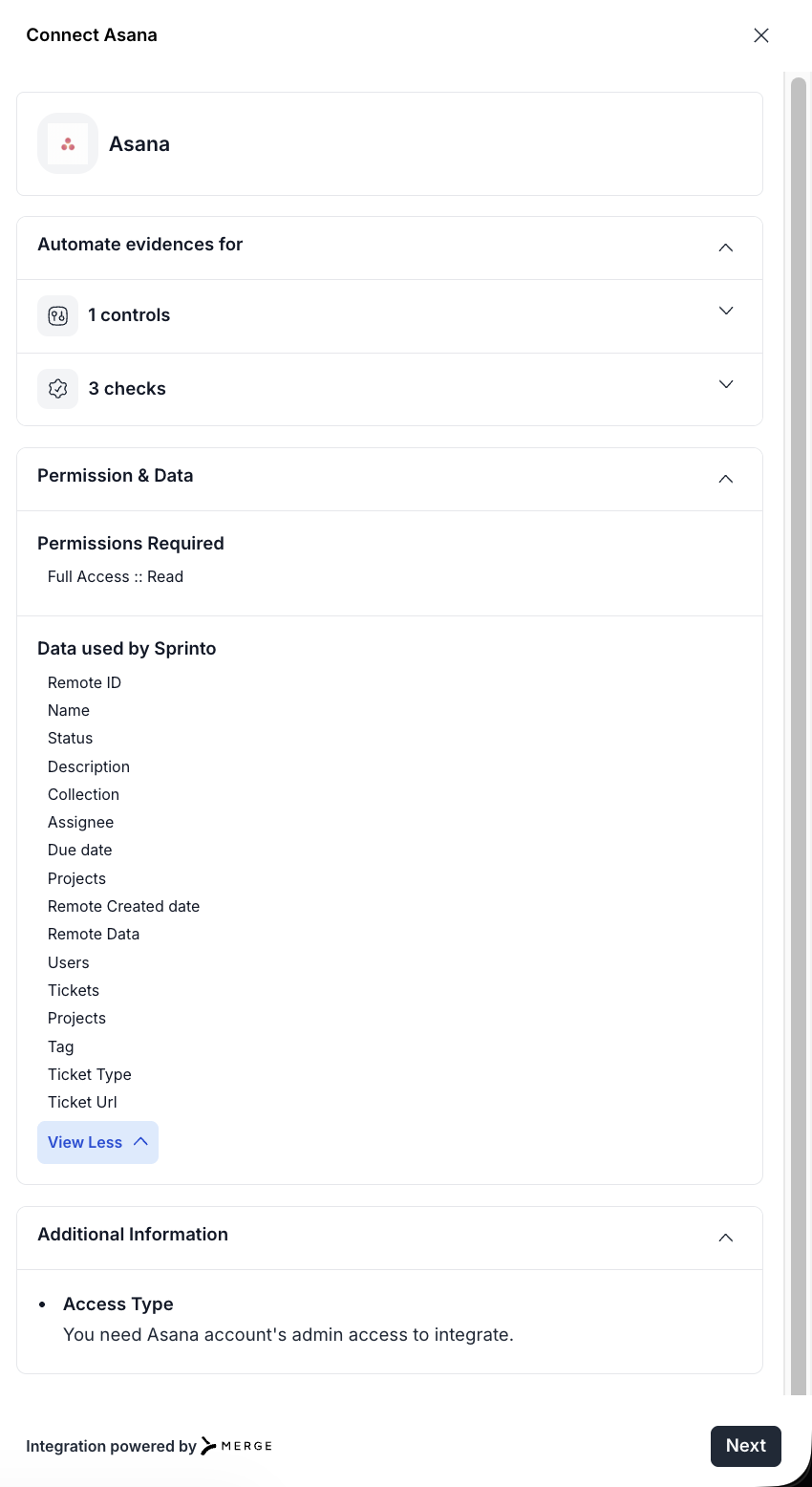
After selecting **Asana (Ticketing)**, a setup drawer opens with details about controls, checks, and data access.

1. Review the **Automate evidences for** section to understand:
   * Number of controls automated
   * Number of checks enabled
2. Expand **Permission & Data** to review:
   * **Permissions required** (read access)
   * **Data used by Sprinto**, including:
     * Ticket details (ID, name, status, description)
     * Assignee and due date
     * Projects and collections
     * Users and tags
     * Ticket URL and metadata
3. Review **Additional information**:
   * Confirms that **admin access to Asana is required**
4. Click **Next** to proceed.

<figure><img src="https://3220032727-files.gitbook.io/~/files/v0/b/gitbook-x-prod.appspot.com/o/spaces%2FEsyn5VMU6e0OyGjRtKgx%2Fuploads%2FXkwKCk4cWccJqZdrFxzN%2FScreenshot%202026-04-13%20at%2015.57.12.png?alt=media&#x26;token=f5e96ebe-fb88-4b04-b60a-e5dcee412cef" alt="" width="375"><figcaption></figcaption></figure>

***

### Configure and initiate connection

A second drawer appears to guide you through the integration setup.

1. Review the setup instructions:
   * Ensure you have **administrator privileges** in Asana
   * Your credentials will be used to sync change management data
2. Select the **I have the admin access** checkbox:
3. Click **Connect to Asana.**
4. You will be redirected to the authentication flow (OAuth or service account, depending on your selection).

<figure><img src="https://3220032727-files.gitbook.io/~/files/v0/b/gitbook-x-prod.appspot.com/o/spaces%2FEsyn5VMU6e0OyGjRtKgx%2Fuploads%2F9UhbdNpsM7v6bgMsF7yI%2FScreenshot%202026-04-13%20at%2015.58.06.png?alt=media&#x26;token=457d6f6f-bdaa-4341-9fac-f3c9b01726b9" alt="" width="375"><figcaption></figcaption></figure>

***

### Choose an authentication method

Sprinto provides two ways to connect Asana:

* **My credentials (recommended)** – Connect using your Asana login
* **Service account** – Connect using a centralised API key

<figure><img src="https://3220032727-files.gitbook.io/~/files/v0/b/gitbook-x-prod.appspot.com/o/spaces%2FEsyn5VMU6e0OyGjRtKgx%2Fuploads%2FXoCDiEk8OVlynQcTkGDD%2FScreenshot%202026-04-13%20at%2015.59.36.png?alt=media&#x26;token=a7702ae8-04e9-4a47-b212-153d55ffd37e" alt="" width="327"><figcaption></figcaption></figure>

***

### Method 1: Connect using My credentials

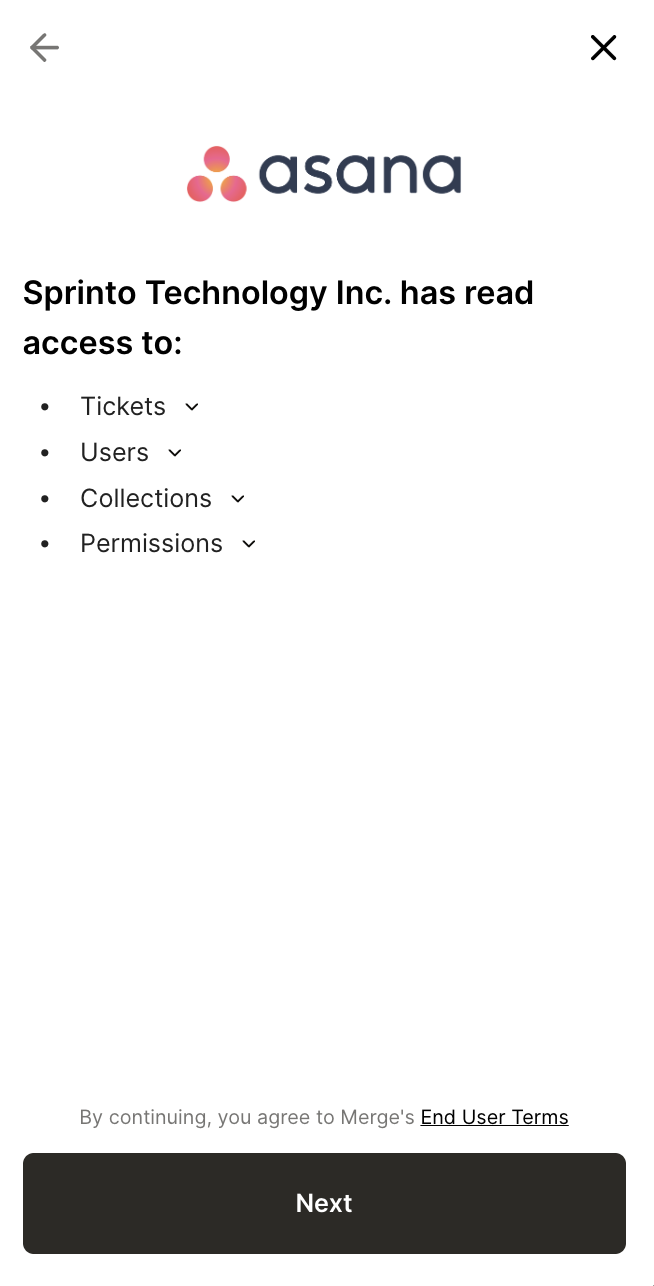
1. Select **My credentials.**
2. Review the access permissions.
3. Click **Next.**

<figure><img src="https://3220032727-files.gitbook.io/~/files/v0/b/gitbook-x-prod.appspot.com/o/spaces%2FEsyn5VMU6e0OyGjRtKgx%2Fuploads%2FhE8GYh1dIXbSLdoeRO9d%2FScreenshot%202026-04-13%20at%2016.00.32.png?alt=media&#x26;token=65d8ec2b-a475-40eb-a975-c1d902ea9da5" alt="" width="327"><figcaption></figcaption></figure>

4. Click **Open window.**

<figure><img src="https://3220032727-files.gitbook.io/~/files/v0/b/gitbook-x-prod.appspot.com/o/spaces%2FEsyn5VMU6e0OyGjRtKgx%2Fuploads%2FHqL9jzyj0HGKK80lckXJ%2FScreenshot%202026-04-13%20at%2016.02.47.png?alt=media&#x26;token=b5e3a61b-714f-4313-904b-b1998b87690d" alt="" width="329"><figcaption></figcaption></figure>

5. Sign in to Asana and authorise access.

Once authentication is complete, Sprinto establishes the connection and begins syncing data.

***

### Method 2: Connect using a service account

Use this method for centralised, long-term integrations.

#### Steps to connect

1. Select **Service account.**
2. Review the access permissions and click **Next.**

<figure><img src="https://3220032727-files.gitbook.io/~/files/v0/b/gitbook-x-prod.appspot.com/o/spaces%2FEsyn5VMU6e0OyGjRtKgx%2Fuploads%2FhE8GYh1dIXbSLdoeRO9d%2FScreenshot%202026-04-13%20at%2016.00.32.png?alt=media&#x26;token=65d8ec2b-a475-40eb-a975-c1d902ea9da5" alt="" width="327"><figcaption></figcaption></figure>

***

#### Confirm access requirements

Before proceeding:

* The service account must have access to all required projects
* Accessing private tickets requires **Asana Enterprise or Enterprise+**
* You must have **super admin privileges**

Click **Next** to continue.

<figure><img src="https://3220032727-files.gitbook.io/~/files/v0/b/gitbook-x-prod.appspot.com/o/spaces%2FEsyn5VMU6e0OyGjRtKgx%2Fuploads%2FKaZTIEUgJtLCwbkVcQJ0%2FScreenshot%202026-04-13%20at%2016.04.40.png?alt=media&#x26;token=68f8b8d4-811b-463f-9998-39d7946b31b1" alt="" width="326"><figcaption></figcaption></figure>

***

#### Add service account API key

1. Create a service account and generate an API key using the [Asana admin and super admin setup guide](https://help.asana.com/s/article/admin-and-super-admin-roles-in-asana?language=en_US#gl-adding-admin).
2. Copy the **Service account API key.**
3. Paste it into Sprinto.
4. Click **Next.**

<figure><img src="https://3220032727-files.gitbook.io/~/files/v0/b/gitbook-x-prod.appspot.com/o/spaces%2FEsyn5VMU6e0OyGjRtKgx%2Fuploads%2FmIP3IA8MKdFJgEeHaLLE%2FScreenshot%202026-04-13%20at%2016.05.36.png?alt=media&#x26;token=b9ba03a8-1b38-4f8c-95ff-840e1cf4b012" alt="" width="328"><figcaption></figcaption></figure>

Sprinto validates the key and completes the integration.

***

### Post-connection behaviour

* Initial sync of tasks and projects begins automatically
* Projects are mapped as collections
* Monitoring checks are activated
* Continuous sync keeps data up to date

***

### Troubleshooting

<table><thead><tr><th width="181.99609375">Issue</th><th width="331.70703125">Resolution</th></tr></thead><tbody><tr><td>401 Unauthorized</td><td>Reconnect the integration</td></tr><tr><td>403 Forbidden</td><td>Ensure admin/workspace owner access</td></tr><tr><td>404 Not Found</td><td>Verify project or task availability</td></tr><tr><td>Rate limiting</td><td>Retry after some time</td></tr><tr><td>Expired connection</td><td>Reconnect the integration</td></tr></tbody></table>

**Additional checks:**

* Ensure the integrating user still has admin access
* Verify project visibility and permissions

***

### Summary

<table><thead><tr><th width="196.73828125">Requirement</th><th width="384.71875">Details</th></tr></thead><tbody><tr><td>Integration type</td><td>Ticketing + Task sync</td></tr><tr><td>Connection method</td><td>MergeDev (OAuth or API key)</td></tr><tr><td>Required role</td><td>Admin or Workspace Owner</td></tr><tr><td>Data collected</td><td>Tasks, projects, users, workflow states</td></tr><tr><td>Special features</td><td>Section-based workflows, changelog tracking</td></tr><tr><td>Security</td><td>Tokens encrypted at rest</td></tr></tbody></table>

***

### Support

If you have any questions or concerns during the integration process, don't hesitate to reach out to Sprinto Support via the in-app chat or write to us at [Sprinto Support](mailto:support@sprinto.com). We're here to help!